 You, Me and Dynamics GP
The premier information site for Microsoft Dynamics GP

Showing posts with label AR. Show all posts
Showing posts with label AR. Show all posts
20 March 2013
Dynamics GP Land: Predicting Payments Based on Average Days to Pay
Christina Phillips explains Predicting Payments Based on Average Days to Pay


06 March 2013
11 February 2013
Weekly Dynamic: AR HATB via SQL
So you want to run the AR Historical Trial Balance report via SQL. Well, in GP 2010 and higher for (I don't have GP 10 handy to test) the AR HATB report is available as an built in SSRS report. The foundation for that report is a SQL stored procedure that we can leverage to run the AR HATB in SQL.
The code to run the stored procedure is below so you can copy and paste it. The middle section is where you set the parameters. Have fun.
Mark
The code to run the stored procedure is below so you can copy and paste it. The middle section is where you set the parameters. Have fun.
Mark
USE TWO
DECLARE @RC int
DECLARE
@I_dAgingDate datetime
DECLARE
@I_cStartCustomerNumber char(15)
DECLARE
@I_cEndCustomerNumber char(15)
DECLARE
@I_cStartCustomerName char(65)
DECLARE
@I_cEndCustomerName char(65)
DECLARE
@I_cStartClassID char(15)
DECLARE
@I_cEndClassID char(15)
DECLARE
@I_cStartSalesPersonID char(15)
DECLARE
@I_cEndSalesPersonID char(15)
DECLARE
@I_cStartSalesTerritory char(15)
DECLARE
@I_cEndSalesTerritory char(15)
DECLARE
@I_cStartShortName char(15)
DECLARE
@I_cEndShortName char(15)
DECLARE
@I_cStartState char(5)
DECLARE @I_cEndState
char(5)
DECLARE
@I_cStartZipCode char(11)
DECLARE
@I_cEndZipCode char(11)
DECLARE
@I_cStartPhoneNumber char(21)
DECLARE
@I_cEndPhoneNumber char(21)
DECLARE
@I_cStartUserDefined char(15)
DECLARE
@I_cEndUserDefined char(15)
DECLARE
@I_tUsingDocumentDate tinyint
DECLARE
@I_dStartDate datetime
DECLARE @I_dEndDate
datetime
DECLARE
@I_sIncludeBalanceTypes smallint
DECLARE
@I_tExcludeNoActivity tinyint
DECLARE
@I_tExcludeMultiCurrency tinyint
DECLARE
@I_tExcludeZeroBalanceCustomer tinyint
DECLARE
@I_tExcludeFullyPaidTrxs tinyint
DECLARE
@I_tExcludeCreditBalance tinyint
DECLARE
@I_tExcludeUnpostedAppldCrDocs tinyint
DECLARE
@I_tConsolidateNAActivity tinyint
-- TODO: Set
parameter values here.
Set
@I_dAgingDate='9/30/12'
Set
@I_cStartCustomerNumber=''
Set
@I_cEndCustomerNumber='ZZZZZZZZ'
Set
@I_cStartCustomerName=''
Set
@I_cEndCustomerName='ZZZZZZZZ'
Set
@I_cStartClassID=''
Set
@I_cEndClassID='ZZZZZZZZ'
Set
@I_cStartSalesPersonID=''
Set
@I_cEndSalesPersonID='ZZZZZZZZ'
Set
@I_cStartSalesTerritory=''
Set
@I_cEndSalesTerritory='ZZZZZZZZ'
Set
@I_cStartShortName=''
Set
@I_cEndShortName='ZZZZZZZZ'
Set
@I_cStartState=''
Set
@I_cEndState='ZZZZZZZZ'
Set
@I_cStartZipCode=''
Set
@I_cEndZipCode='ZZZZZZZZ'
Set
@I_cStartPhoneNumber=''
Set
@I_cEndPhoneNumber='ZZZZZZZZ'
Set
@I_cStartUserDefined=''
Set
@I_cEndUserDefined='ZZZZZZZZ'
Set
@I_tUsingDocumentDate=0
Set
@I_dStartDate='1/1/1900'
Set
@I_dEndDate='9/30/12'
Set
@I_sIncludeBalanceTypes=0
Set
@I_tExcludeNoActivity=1
Set
@I_tExcludeMultiCurrency=1
Set
@I_tExcludeZeroBalanceCustomer=1
Set
@I_tExcludeFullyPaidTrxs=1
Set
@I_tExcludeCreditBalance=0
Set
@I_tExcludeUnpostedAppldCrDocs=1
Set
@I_tConsolidateNAActivity=0
EXECUTE @RC =
[dbo].[seermHATBSRSWrapper]
@I_dAgingDate
,@I_cStartCustomerNumber
,@I_cEndCustomerNumber
,@I_cStartCustomerName
,@I_cEndCustomerName
,@I_cStartClassID
,@I_cEndClassID
,@I_cStartSalesPersonID
,@I_cEndSalesPersonID
,@I_cStartSalesTerritory
,@I_cEndSalesTerritory
,@I_cStartShortName
,@I_cEndShortName
,@I_cStartState
,@I_cEndState
,@I_cStartZipCode
,@I_cEndZipCode
,@I_cStartPhoneNumber
,@I_cEndPhoneNumber
,@I_cStartUserDefined
,@I_cEndUserDefined
,@I_tUsingDocumentDate
,@I_dStartDate
,@I_dEndDate
,@I_sIncludeBalanceTypes
,@I_tExcludeNoActivity
,@I_tExcludeMultiCurrency
,@I_tExcludeZeroBalanceCustomer
,@I_tExcludeFullyPaidTrxs
,@I_tExcludeCreditBalance
,@I_tExcludeUnpostedAppldCrDocs
,@I_tConsolidateNAActivity
29 January 2013
When Your Big Customer Wants to Pay Late
CFO Magazine has a new article on When Your Big Customer Wants to Pay Late. We've talked about some things in GP around this including Customer/Vendor priority, terms, discounts and analytics. The article has some nice examples of creative solutions.
22 January 2013
19 December 2012
Automating Electronic Payment Processing | Dynamics University
I had the chance to show off some Azox functionality recently and it's pretty nice. Check out Automating Electronic Payment Processing for more info.
18 December 2012
26 November 2012
Year end – Receivables Management « DynamicsGP.ie – Global Insights from Ireland
MVP Ian Stewart shares his plan for Year end – Receivables Management
Microsoft Dynamics GP Year-End Release 2012: Receivables Management Year End Close
The GP Support and Services team looks at Microsoft Dynamics GP Year-End Release 2012: Receivables Management Year End Close
21 November 2012
Do You Run Paid Transaction Removal in Dynamics GP Receivables Management?
Sheldon asks Do You Run Paid Transaction Removal in Dynamics GP Receivables Management? I do. I'm just sayin'.
14 November 2012
17 October 2012
How to void a historical transaction in Receivables Management
On the Dynamics GP Support and Services blog, Cheryl W. shows How to void a historical transaction in Receivables Management.
15 October 2012
Microsoft Dynamics GP AR Tools
Belinda Allen looks at Microsoft Dynamics GP AR Tools in her new post.
25 September 2012
Introducing a New Program for Accounts Receivable Professionals
Here is the official announcement Introducing a New Program for Accounts Receivable Professionals
05 September 2012

16 August 2012
13 August 2012
Weekly Dynamic: Override AR Writeoff
In Dynamics GP you can set a maximum write off amount for a customer on the Customer Maintenance Options card. (Cards | Customer, click options). This works great for controlling small writeoffs, little short pays, etc.

At some point though you'll need to write off something larger. A great way to do this is to add a password to exceed the maximum write off. This is set in Receivables Setup.

At one time or another you'll have write off's and GP gives you lots of options.

At some point though you'll need to write off something larger. A great way to do this is to add a password to exceed the maximum write off. This is set in Receivables Setup.

At one time or another you'll have write off's and GP gives you lots of options.
30 July 2012
25 July 2012
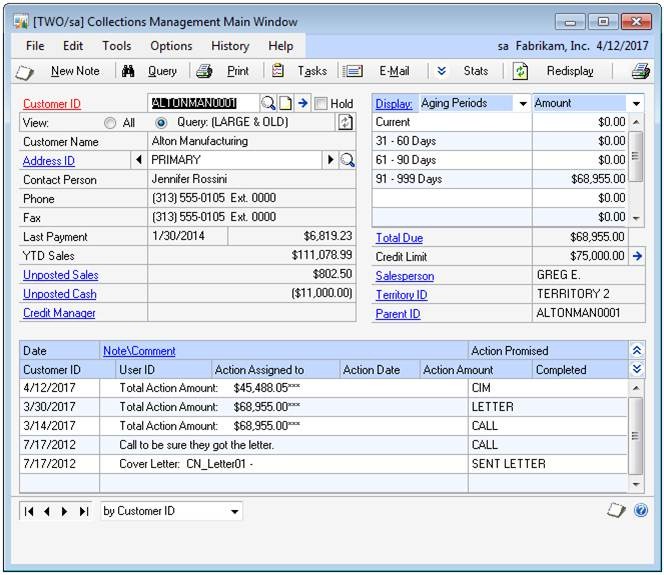
Strategies for Collections Management In Dynamics GP
Judy from Etelligent offers some Strategies for Collections Management In Dynamics GP
18 July 2012
.jpg)
Subscribe to:
Posts (Atom)