 You, Me and Dynamics GP
The premier information site for Microsoft Dynamics GP

Showing posts with label Purchase Orders. Show all posts
Showing posts with label Purchase Orders. Show all posts
20 November 2012
Managing Purchase Orders in GP 2010 | onza blog
Amanda Wong looks at Managing Purchase Orders in GP 2010 | onza blog


15 November 2012
30 October 2012
Dynamics GP 2013 (beta) – PO Prepayments
Steve Chapman looks at the Dynamics GP 2013 (beta) – PO Prepayments feature.
08 August 2012
Using Buyer ID’s in GP 2010 | onza blog
Amanda Wong looks at alternative ideas for Using Buyer ID’s in GP 2010 , assuming that you don't have buyers of course.
31 July 2012
12 June 2012

07 June 2012
Collins Dynamics GP Blog: PO Automatically (??) Closed
From Collins Computing, is there a ghost in the machine to make PO Automatically (??) Closed
29 May 2012

17 May 2012

20 February 2012

09 February 2012
Purchase Order Returns Modification - Developing for Dynamics GP
David Musgrave looks at the Purchase Order Returns Modification

14 November 2011
Mohammad R. Daoud: Purchase Order Commitments View
Mohammad Daoud gives us a Purchase Order Commitments View
09 August 2011
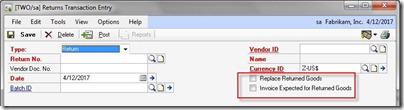
DynamicsBlogger: Purchase Returns Treatment Enhancements in GP 2010
Janakiram M.P. continues with a look at Purchase Returns Treatment Enhancements in GP 2010
Fixed name. oops.
Fixed name. oops.
08 August 2011
DynamicsBlogger: Edit PO Status Enhancement in GP2010
Janakiram M.P. tells us about Edit PO Status Enhancement in GP2010

27 June 2011
03 February 2011
Weekly Review: Copy a P.O.
If you're working in Dynamics GP and you realize that you need a P.O. that looks a lot like one you did last week, don't re-key all those lines. Use the Create and Copy New PO button under Actions.
To get there, go to Transactions->Purchasing->Purchase Order Entry. Click the Actions button and pick Create and Copy New PO. A window will pop up asking for the source P.O. and then you get to tailor the new P.O. that gets created. You can set the Vendor, Currency, Customer, Dates, Sites and Cost options.
Also you can optionally:
- Copy all P.O. lines
- Include cancelled lines
- Include cancelled quantities
- Display the new PO when done
- Copy freight, miscellaneous or shipping amounts from the original
- Copy Ship to Address, method and Tax ID from the source PO

Originally Posted by Mark at 12/01/2008 09:00:00 AM
09 December 2010
Reversing the effect of erroneous PO Receipts
Frank Hamelly takes a minute to look at Reversing the effect of erroneous PO Receipts
29 March 2010
Cannot change the XXX account at the Summary Level
A the Great Plains Guy site, David Maryland looks at errors that can occur when trying to change accounts during PO/Receipt/Invoice 3 way matching in the post Cannot change the XXX account at the Summary Level.
10 February 2010

Subscribe to:
Posts (Atom)