
 You, Me and Dynamics GP
The premier information site for Microsoft Dynamics GP

Showing posts with label Backup. Show all posts
Showing posts with label Backup. Show all posts
27 November 2012
20 September 2012
Feature of the Day: Update 1099 Information - Inside Microsoft Dynamics GP - Site Home - MSDN Blogs
1099's get a facelift in GP 2013. Learn more at Feature of the Day: Update 1099 Information


30 August 2012
Creating a Dynamics GP Backup Plan | Dynamics GP Insights
Nathan Hayden looks at Creating a Dynamics GP Backup Plan. I've become a fan of Restore plans and that's the one thing missing from Nathan's otherwise great advice. Regularly scheduled test restores. At lease annually, preferrably quarterly.
16 July 2012
Microsoft Dynamics GP and Schrödinger’s Cat | azurecurve
Ian Grieve goes all Big Bang Theory with a look at Microsoft Dynamics GP and Schrödinger’s Cat
11 April 2012
A Couple of Recent Backup Stories
In our Worst Mistakes You Make With Dynamics GP presentation for GPUG John Lowther and I harped on backups. Two articles out today show why.
Jack Boyer describes recent backup lapses with Dynamics SL and GP
Doug Pitcher offers a cloud based example on the importance of backups
I do want to point out one thing. “The Cloud” generically is not a panacea for backups.
For example, NetSuite is a cloud based competitor. Despite what folks say in their marketing, companies don’t really lie to the SEC.
From NetSuite’s March 2010 10K filing:
“We currently operate and maintain an offsite facility for customers who specifically pay for accelerated disaster recovery services. For customers who do not pay for such services, although we maintain tape backups of their data, we do not operate or maintain a separate disaster recovery facility, which may increase delays in the restoration of our service for those customers.”
Tape backups are notoriously unreliable and the accounting literature is full of accountants responsibility for managing risk. Performing backups may be IT’s responsibility but the financial statements belong to us. Ensuring that the data is available is part of our job as well.
07 February 2012
20 December 2011

15 December 2011
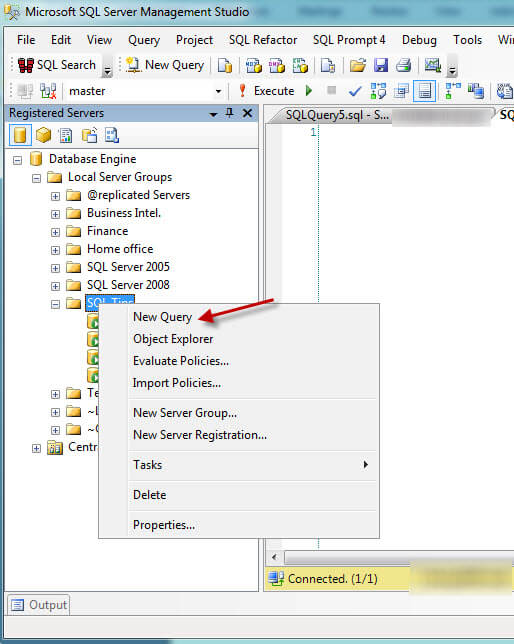
Standardize SQL Server backups and maintain existing job schedules
In a great tip for accidental administrators, MSSQLTips shows how to Standardize SQL Server backups and maintain existing job schedules
08 December 2011
Weekly Review: SQL Script to Monitor Transaction Log Backups
We see a surprising number of huge transaction logs in clients who should know better. This commonly happens when transaction logs are not being backed up regularly and the database is running in Full recovery mode. If the log grows large enough, SQL Server can stop working leading to a lot of excitement.
Typically, this solved with a properly setup maintenance plan in SQL Server but what if that's not the case? What if the maintenance plan is failing and not providing notifications? Short of regularly monitoring transaction log growth, how can a DBA ensure that logs are being properly truncated?
Thanks to the MSSQLTips site, we've now got this SQL Script designed to show any databases in Full or Bulk-Logged recovery model that have had a full backup without any subsequent transaction log backups.
SELECT
D.[name] AS [database_name], D.[recovery_model_desc]
FROM
sys.databases D LEFT JOIN
(
SELECT BS.[database_name],
MAX(BS.[backup_finish_date]) AS [last_log_backup_date]
FROM msdb.dbo.backupset BS
WHERE BS.type = 'L'
GROUP BY BS.[database_name]
) BS1
ON D.[name] = BS1.[database_name]
LEFT JOIN
(
SELECT BS.[database_name],
MAX(BS.[backup_finish_date]) AS [last_data_backup_date]
FROM msdb.dbo.backupset BS
WHERE BS.type = 'D'
GROUP BY BS.[database_name]
) BS2
ON D.[name] = BS2.[database_name]
WHERE
D.[recovery_model_desc] <> 'SIMPLE'
AND BS1.[last_log_backup_date] IS NULL OR BS1.[last_log_backup_date] < BS2.[last_data_backup_date]
ORDER BY D.[name];More information on this script and similar scripts is available from MSSQLTips.com

Originally Posted by Mark at 1/11/2010 09:00:00 AM
30 November 2011
7 Preventable Backup Errors
One of the Worst Mistakes you can make with Dynamics GP is not backing up. This piece from Simple-Talk on 7 Preventable Backup Errors is brilliant. It covers all of the common backup errors I see around Dynamics GP and SQL server except for running out of space on TempDB. But that fits in pretty closely with the “Running out of Space” section.
20 October 2011
Weekly Review: Schedule Backups from Within Dynamics GP
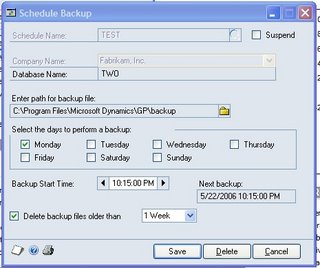
Dynamics GP 9 and up allows you to schedule backups from within the application. You'll need to be logged in to GP as an administrator and you'll need to be on the server. Go to File-Backup. Enter the system password if you've set one. The backup window opens, pick Schedule.
- Name the backup schedule
- Pick the database to backup or backup the system databases
- Enter the backup path (this must be a path on the local server)
- Select the days to backup and the time. The time is entered is in a 24 hour format
- Pick how often to delete old backups
- Click Save. --SQL Agent MUST be running when you click save--
This process creates a job in the SQL agent with the information entered. You can modify the job through the GP interface or via SQL to set more advanced options (like notifications). No, I don't expect DBA's to be using this, they'll create their own SQL Jobs, but if you don't have a dedicated DBA, this is a good start. You'll still need to move the backups off the server for real protection but that's easier with today's portable hard drives. There's no excuse for not backing up your Dynamics GP installation now.
Originally Posted by Mark at 11/12/2009 09:00:00 AM
30 August 2011
Public Service Announcement: Don't Trust Hard Drives - Developing for Dynamics GP
Dave Musgrave reminds us: Don't Trust Hard Drives.
I’m not quite sure how to emphasis recovery plans any more than I do but I suspect that this topic will show up in the Worst Mistakes You can Make with GP presentation coming to the GPUG Summit.

03 November 2010
Backing up and Restoring data when recreating SQL Tables in Dynamics GP
David Musgrave is back with a look at Backing up and Restoring data when recreating SQL Tables in Dynamics GP.
15 July 2010
SQL Server Backups: A Public Service Announcement
Steve Endow of Dynamics GP Land shares the GP Backup soapbox this week with Belinda, the GP CSI and me. I can’t make you have adequate backups. Maybe we could have a swear jar. Every time a client swears they have put in a buck. When the server crashes without backups there will be enough swearing to pay pay the consulting bill. Check out Steve’s post: SQL Server Backups: A Public Service Announcement for examples of people who should know better.
13 July 2010
Dynamics GP Backup? I don't need no stinking Backup!
Belinda the GP CSI has a look at something near and dear to my heart, back ups in Dynamics GP. Make sure you check out Belinda’s post: GP CSI: Backup? I don't need no stinking Backup!
12 March 2010
A Word About Backups
I was worried that too many of you don’t care enough about backups. Based on the small number of responses to our latest Facebook poll I’m right. You either don’t know or don’t care enough to even vote in the poll. It makes me wonder about your backups.
In many companies, the problem is that Finance is responsible for the financial system, not I.T. Consequently, I.T often washes its hands of backing up financial data. Backing up Dynamics GP is important. Whether it is your responsibility to manage the backup or not, the risk management requirements placed on finance and accounting departments and your responsibility for the financial statements means that you have a requirement to understand how you Dynamics GP data is being preserved..
I’ll leave the poll up for a few days to let the guilt set in and then I’ll put a new one up.
17 February 2010
New Facebook Poll: How often do you backup Dynamics GP?
There is a new poll up on the Facebook Fan Page. I'd like to know how often you backup Microsoft Dynamics GP. It's always been a sore spot for me and I'm curious about what a broader segment of users actually does.

26 January 2010
Backup!
Steve Endow tackles one of my favorite subjects, regular backups in Dynamics GP. Great job Steve, though I suspect it will still take a catastrophic event to make some people backup regularly.
Update: Added Missing Link

Update: Added Missing Link
04 January 2010
Weekly Dynamic: Backup Test and Development Databases
A common refrain is that there is no reason to backup Dynamics GP test or development databases. The thought is that since these are not production databases there's no need to back them up. While its true that most test databases can be recreated from production that doesn't mean that they shouldn't be backed up. It's usually faster to restore than to rebuild an environment.
It's easy to forget about situations where users are testing a new module and have put in substantial testing time and energy. Nobody likes to start over. As for development databases, even though the code may be stored elsewhere, it's still faster to restore a database than to rebuild and environment.
Obviously test and development databases typically don't need to be backed up with the same frequency or recovery availability of production databases, but not backing these up is short sighted. Save yourself some embarrassment and pain and start the new year by backing up your Dynamics GP test and development databases.
Subscribe to the newsletter.

It's easy to forget about situations where users are testing a new module and have put in substantial testing time and energy. Nobody likes to start over. As for development databases, even though the code may be stored elsewhere, it's still faster to restore a database than to rebuild and environment.
Obviously test and development databases typically don't need to be backed up with the same frequency or recovery availability of production databases, but not backing these up is short sighted. Save yourself some embarrassment and pain and start the new year by backing up your Dynamics GP test and development databases.
Subscribe to the newsletter.
22 October 2008
Automated GP Database Backups with SQL Express
Jivtesh has coverage of how to setup GP backups when using SQL Express. Hint, there's no SQL Agent so it's harder than you think.
Subscribe to:
Posts (Atom)