 You, Me and Dynamics GP
The premier information site for Microsoft Dynamics GP

Showing posts with label Help. Show all posts
Showing posts with label Help. Show all posts
14 May 2012
Finding resources | Victoria Yudin
Victoria Yudin has some new help for Finding resources for Dynamics GP.


Weekly Dynamic: Dynamics GP Manuals
I got an email from an IT person a few weeks ago. They were annoyed that their consultant didn't leave the manuals for Dynamics GP. I know that I regularly get new readers so I thought that would also cover the answer here.
The manuals are included with the help for Microsoft Dynamics GP. They are located in Help-Printable Manuals.
Each area listed can have multiple manuals. All the manuals are in PDF format and they commonly run a couple of hundred pages each. That's one reason why you don't get a printed set of manuals. The other reason is that too many people never read them and it's expensive to print stuff that no one reads.. I was a at a long time client recently. They are on GP 2010 and had recently cleaned out old filing cabinet. They found GP 6.0 manuals still wrapped in plastic never opened.
The included printable manuals are searchable and do a great job with the what and how. Sometimes they fall down on the why. If you're looking for help beyond the manuals, I highly recommend the Microsoft Dynamics GP 2010 Cookbook of course.

22 August 2011
Microsoft Dynamics GP: One Key To Rule Them All | azurecurve
azurecure extols the virtues of Microsoft Dynamics GP help in One Key To Rule Them All .
23 April 2010
Weekly Review: Help | About
Don't ignore Help | About Microsoft Dynamics GP when you start working in GP. This is more than just the version number. Included in About are all major version numbers (GP, Dexterity, Smartlists, SQL, etc). You can check these against the version data on the DynamicAccounting.net homepage to make sure you're up to date.
Also included is the database size for company you're logged in to. This can be very important if your SQL server or backup device is short on space. This is actually harder to find than you think in SQL.
The Options button shows all the products and modules you're registered for. This is very helpful when you can't remember if you bought that module and just aren't using it of if you put off the purchase until the next budget cycle. If you bought it, it has a checkbox next to the item.
Originally Posted by Mark at 11/20/2006 02:35:00 PM
21 January 2010
Weekly Review: Field Help
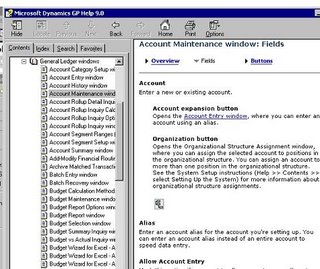
For those of you new to Dynamics GP, there's a help feature that I want to make sure I point out to you. It's field help. In GP you can get specific help on any field in the program. Simply highlight the field you're interested in. Ht the help key, F1. Hit the field key. You will see a list of each field on that form along with information about that field. This is especially helpful with new releases. Often with a new release, you'll see a new field, but you won't know what it does. This helps you understand those new fields and sometimes you find a new function that it makes it feel a little like Christmas.
20 November 2006
Weekly Dynamic: Help-About
Don't ignore Help-About Microsoft Dynamics GP when you start working in GP. This is more than just the version number. Included in About are all major version numbers (GP, Dexterity, Smartlists, SQL, etc). You can check these against the version data on the DynamicAccounting.net homepage to make sure you're up to date.
Also included is the database size for company you're logged in to. This can be very important if your SQL server or backup device is short on space. This is actually harder to find than you think in SQL.
The Options button shows all the products and modules you're registered for. This is very helpful when you can't remember if you bought that module and just aren't using it of if you put off the purchase until the next budget cycle. If you bought it, it has a checkbox next to the item.

09 August 2006
Weekly Dynamic: Field Help
For those of you new to Dynamics GP, there's a help feature that I want to make sure I point out to you. It's field help. In GP you can get specific help on any field in the program. Simply highlight the field you're interested in. Ht the help key, F1. Hit the field key. You will see a list of each field on that form along with information about that field. This is especially helpful with new releases. Often with a new release, you'll see a new field, but you won't know what it does. This helps you understand those new fields and sometimes you find a new function that it makes it feel a little like Christmas.
Subscribe to:
Posts (Atom)