30 November 2009

Tip on Applying Labor to an Inventory BOM

Frank Hamelly is back with a tip on applying labor to an inventory bill of materials in Dynamics GP.

SQL Code to Get the Most Recent Purchase Receipt for an Item

Mariano Gomez took a break from his long Thanksgiving weekend to post a SQL Script to get the most recent inventory receipt information along with more information about on hand inventory.

Info on Project Accounting General Entries

In a new tip, Frank Hamelly takes a look at general entries in Project Accounting. The title is Project Accounting Accruals and Frank uses an accrual example to demonstrate how to use Misc. Log entries.

Weekly Dynamic: Report Writer Exports to Excel

Exporting Report Writer reports to a file for use in Excel is real pain. The headers export as well and lines wrap creating an awful lot of cleanup to make the report usable in Excel. Well the Support Debugging Tool provides an option in the Dex.ini settings area to prevent line wrapping in text report exports.

This eliminates one of the biggest problems of exporting Report Writer reports to Excel. Generally sorting options can clean up the headers pretty easily. While this doesn't eliminate the pain of sending RW reports to Excel it doesn make the process easier. The Support Debugging Tool is available from your partner. More information is available here.

25 November 2009

Information on Negative Payroll Deductions

Cindy Mikeworth has a new post up at Total Accounting Solutions looking at Negative Payroll Deductions.

Weekly Review: Change Column Names in Smartlists

Just in case you forgot this from your original GP training, it's important to note that you can change the titles of columns on Smartlists. This means that "QTY Allocated" can be changed to show "Quantity Allocated" on the smartlist. You can also change it to anything else! To do this:

  1. Open a Smartlist up.
  2. Select Columns.
  3. Pick an item in the Display Name column and change the name.
  4. That's it. To save the changed name for this smartlist, save it as a favorite.
That's it. It's easy as can be, but not very obvious. If you have a lot of Excel sheets where you end up changing the titles every time you export from GP, this is a great tip.

Originally Posted by Mark 6/06/2006 11:03:00 AM  

Info on the Document Date Verify Tool for GP

Frank Hamelly takes a look at the available Document Date Verify tool for Dynamics GP. This tool verifies that a document date falls within an existing period in Fiscal Period setup.

Solving Win 7 font issues with Dynamics GP

David Musgrave has some new insights up at Developing for Dynamics GP. He takes a look at a solution for the problem of overly large fonts displaying by default that can happen when using Windows 7 and Dynamcis GP. Best of all, he provides a fix.

Happy Thanksgiving!

Tomorrow we celebrate the Thankgiving holiday here in the U.S. so don't expect any updates tomorrow. The Weekly Review will be out later today so take a break and enjoy tomorrow!

Interview with Dynamics GP MVP Frank Hamelly

DynamicsWorld.co.uk has a new interview up with fellow Dynamics GP MVP Frank Hamelly. Make sure that you check it out.

Creating Quick and Dirty Financial Statements in FRx

Frank Hamelly's latest tip covers creating a quick and dirty income statement or balance sheet in FRx using account type.

GP Error Tracing from Mohammad Daoud

Mohammad Daoud has a new post up on tracing errors caused by the language not being set to English in Dynamics GP.

23 November 2009

WSS or MOSS 2007

What's better for Dynamics GP users, Windows Sharepoint Services (WSS) or Microsoft Office Sharepoint Services 2007 (MOSS)? The answer of course it "it depends". To help you figure out what it depends on, DynamicsBlogger has a nice set of guidelines up. I would add that version 11 is supposed to support Workflow on WSS not just MOSS so there's one more item to consider.

Upgrading to SQL 2008

Frank Hamelly gets a little technical with his latest tip as he looks at some great new features in SQL 2008 and SSRS.

Excel Report Builder: "Wrong Number of Arguments to Replace Text"

Over at DynamicsBlogger, Janakiram M.P. has put a bunch of new posts that I'll be highlighting. One of them looks at an error that occurs with service pack 4 and Excel report builder. Janakiram takes us through the issue and the current, temporary, resolution.

Dynamics Extensions

On Thursday, Microsoft announced three new add on services for the Dynamics ERP products. They include Site Service, a web development application, Commerce Service, a multi-channel e-commerce solution and an enhanced version of Microsoft's payment service. All of this launches next year so partners should get more information soon about how this will affect Dynamics GP specifically. Additionally, it's cool to see that Size Service is based on Azure, Microsoft's next generation database in the cloud.

Microsoft, SAP and BI

Microsoft is tapping SAP's BusinessObjects to help fill the gap after the PerformancePoint debacle. I had heard that this was coming several weeks ago so it's not a big surprise and the eweek article covering it is essentially a press release. More than that however, we had a client get a demo of BusinessObjects' Planning and Consolidation product and they saw functionality similar to the millions of rows in memory functionality in found in PowerPivot now in beta for Excel 2010.

The bottom line is that Microsoft had to do something. The roadmap for FRx/Forecaster/Enterprise Reporting just left too long of a gap between where they are and where they want to be. The risk to SAP is that this becomes another Crystal Reports, pushed by MS for a while and then dumped when the FRx set of products get farther down the road. I also don't think that they do a great job of selling the Excel/Excel Services/PerformancePoint Services/Sharpoint stack against dedicated BI solutions. It's too much like selling parts not solutions.

The bottom line is that I don't think that Microsoft is ready to abandon the BI space to anyone long term. I just don't have any insight into what the long term solution will really be for MS yet.

Note Lines and GP Web Services

Over at Dynamics GP Land, Steve Endow has coverage of formatting note Lines using web services for Dynamics GP. Hint, it doesn't work the way you think it should work.

Accessing a Table Buffer when it is not passed as a Parameter

David Musgrave takes a look at accessing a table buffer when it is not passed as a parameter as part of his Three Trigger Technique series. Sure it sounds like something from an old west movie, the three trigger technique, but it's much cooler than that, it Developing for Dynamics GP.

Dynamics GP Testing

Everyone welcome Alice from the Dexterity testing team! She has her first blog post up at Developing for Dynamics GP. In her first post, Alice tackles test environments and testing automation options. Welcome to the conversation Alice!

Blank Currency ID During an econnect Integration

What happens when the Currency ID remains blank after an econnect integration even though the functional currency is set correctly? The DynamicsBlogger has the answer and the fix.

GP Refund Checks

Tim Williams of AMLLP has a new post up looking the often underused GP Refund Checks functionality.

Slow Inventory Posting

Mariano Gomez is back with a look at why inventory related transactions may be posting slowly.

FRx Transaction Detail Codes for Dynamics GP

New at DynamicsBlogger, Janakiram M.P. is providing a handy list of all of the FRx Transaction Detail codes that work with Dynamics GP.

Weekly Dynamic: Complex Web GoTos in Smartlists

Developing for Dynamics GP has covered passing complex parameters through shortcuts in the past. Similarly, I recently had a chance to pass a complex parameter to a web page through a GoTo on a Smartlist. I thought I would spend a few minutes showing how this works.

The basic scenario was simple. A client needed to pass an invoice number as a parameter to an internal web page connected to an imaging system. Clicking the GoTo would open a web browser, pass a URL with the embedded parameter and an invoice image would open.

When using Smartlist Builder there is a button to create a GoTo. Clicking the button opens the GoTo window. The Plus (+) button creates a new GoTo and one option is to open a webpage. So far so good.

Clicking the Open Webpage option lets you set a description to appear and a enter a URL. To just open a web page, that's all that needs to be setup. Clicking the plus sign allows the assignment of parameters. This useful for sending search strings to say Bing or Google and in our example, an imaging website.

The parameter gets a name that is actually passed as part of the parameter string. The parameter can only be 30 characters long. In addition, you select a table and field from the Smartlist to pass. Multiple parameters can be added by clicking plus.

For the first parameter, GP Actually passes the website, a question mark (?) to indicate a parameter, the parameter name, an equal sign and the field value from the select field in the Smartlist.

For example, a Bing search for Dynamics GP would look like this:
URL: http://www.bing.com/search
parameter: q
smartlist field value: Dynamics GP

The GoTo would put it together like this: http://www.bing.com/search?q=Dynamics GP

For basic queries this works great, but what if the parameter is more than 30 characters? What if the parameter you're passing needs to be in the middle of a parameter string? Don't worry, there's a way around this.

The secret is to create a calculation and pass the calculated result ot the GoTo. My client had a very long parameter string with the invoice number at the end so here is what I did:

  1. I grabbed the entire parameter string AFTER the first equal sign (=). I would need that for the parameter later.
  2. Created a calculation in Smarlist builder using the calculation button and pasted the parameter string in as a calculation with single quotes around it for SQL.
  3. Then I added a plus sign (+) and selected the invoice number from the available fields at the right. This gave me almost the entire parameter string. The calculation looked like this:
  4. Finally I created a new GoTo with the parameter information before the equal sign as my parameter name and selected the calculated field instead of the invoice number as the field to append to the end.
Everything worked perfectly and now selecting a GoTo from that Smarlist reports fires up a web browser and displays the related image.

As we worked with this for a few days we learned a couple of things. The invoice number passed through the calculation could also be passed as a second parameter instead of being embedded in the calculation. The only real benefit is clarity.

Secondly, the Smarlist field being passed as a parameter needs to be included as a key field in table. We missed this the first time. The Smarlist was built off a single view and didn't need a key field except to satisfy Smarltist Builder so Batch Number had been randomly picked as the key field.

Consequently, until we added Invoice Number as a key field, Smartlist Builder was passing as parameter an invoice from the batch that included that invoice number, but not necessarily the right invoice number. It was occassionally right and often wrong. Including Invoice Number as a key field in the Smartlist solved this problem.


Don't be a Propellerhead

Steve Endow takes a look at the pitfalls of techno love and how it can lead to over-engineering of customizations for Dynamic GP. Check the whole thing out at Dynamics GP Land.

Technorati Tags:

19 November 2009

Letter Writing Assistant

Frank Hamelly tackles the Letter Writing Assistant in Dynamics GP today.

Account Entry Checkbox

Also new at Rose Business Solutions, Liane McIlraith looks at what the Account Entry checkbox does and how it can help reconciling.

Removing Discontinued Items During Inventory Year End

New at Rose Business Solutions, Liane McIlraith takes a look at removing discontinued items during inventory year end.

What's New in GP 11

I marked this last week but forgot to blog it. Bryn Forrest of InterDyn AKA has a post up looking at what's coming in GP 11 next year.

Looking for Job Working with Dynamics GP?

CFO coach Cindy Kraft has a great article up on searching for a job. In it she recommends pursuing your sweet spot and finding companies that need value your expertise. If you work with Dynamics GP you've already got a "sweet spot", a niche that sets you ahead of the competition, your knowledge of Dynamics GP.

One of my favorite hires as a controller was a Purchasing employee who already knew Dynamics GP. On the first day she asked "where is the chart of accounts?". Two hours later she was cutting P.O.'s. All she had to do was learn the company, not the systems. Despite having one of the most bizzare personal lives I've ever seen, I'd happily hire her again. Yes I'm talking about you Shannon.

So if you're looking for work and you know Dynamics GP you need to understand how to leverage this. I've paid more for an employee who knew GP because I knew that I wouldn't have a six month learning curve. They could be productive by day 2. Part of the reason I was hired as a controller was my knowledge of GP. On my first day, before I had even found my desk, the CFO commented "it's February and we haven't finished closing the year in GP. Can you get that done today?". I did. Any thoughts on what value that brought to the organization versus a non-GP hire?

Leverage what you know. Use Dynamics GP or Great Plains as keywords in searching. Leverage GP partners you who may have clients with needs. Leverage all of this great social media stuff for connections to GP people. Folks with knowledge of Dynamics GP are still in high demand. You just have to find your connection.


Dynamics GP Auto Complete
Frank Hamelly takes a look at one of my favorite features in Dynamics GP, Auto Complete.

Objective Measures: Financial Performance

Dwight Specht is back continuing his series on managing a Dynamics consulting practice. In his latest post, Dwight takes a look at objective measurements starting with Financial Performance. It's definitely worth reading. I've got it memorized since it directly applies to me.

Weekly Review: Smartlist Reminders

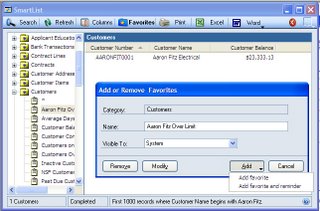
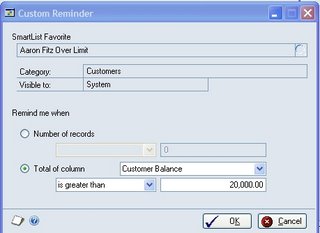
In Dynamics GP you can create a custom reminder based on Smartlist data. The system comes with a number of preset alerts but if, for example, you wanted to get an alert if a specific customer balance was over $20,000, you can do it. Doing this is easy.
1) Setup your Smartlist
2) Pick Favorites and name the Favorite.
3) Click Add and select Add Favorite and Reminder
4) Select Total of Columns, pick the column and how you want to total
5) You can set reminders based on the number of records or the total of the column
6) Click OK
  • You can setup a reminder for an existing Smartlist by going to Tools >> Setup >> User Preferences >> Reminders button
  • When you delete the Favorite, it deletes the reminder
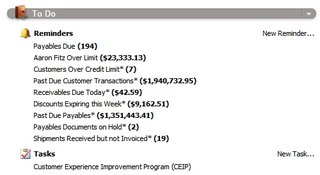
  • Reminders appear on the Home Page


Originally Posted by Mark 5/22/2006 10:04:00 PM

18 November 2009

Setting the Correct Distribution Accounts for Inventory Transfers

Mohammad Daoud has a new, screen-shot filled article covering automatically setting the correct distribution accounts when creating inventory transfers. Definitely worth a look.

Tech Conference Wrap Up

David Musgrave has a quick wrap up to the GP Tech Conference and links to all the related posts.

Differences between the Dynamics Products

There's a lot of buzz going around currently about an article on Manufacturing Software Advice that compares the different Dynamics ERP products. I've got a f nit pick to start with, Project Management is available for Dynamics GP. The Project Accounting module works just fine if you have a competent consultant. (There a lot of incompetent consultants around PA.)

The base comparisons seem fine but I really struggle with the conclusions because I think they are misleading so let's get past some MS hype and look at my take on the four products with an admitted GP bias. (I do run a GP site after all.) However, don't lose sight of the best part, all of these are Microsoft products. The market is fighting it out under the MS umbrella.

1) SL - SL is all but dead. Say what you want but once the development was outsourced back to the founders it was an indication that it was a redheaded step child. GP will continue enough development to keep it competitive with Sage but MS will be trying to see what they can get for a fixed annual investment.

2) NAV - NAV looked like a front runner for a while. So let's talk facts first. If NAV has the highest number of installed units, the users are not engaged. The number of NAV users and sessions is significantly lower at Convergence in the US compared to GP attendees. In Europe, where their presence should be higher, Convergence shrunk to a roadshow this year with significantly fewer attendees. If you talk to folks who compete against NAV the problem is that the implementation time and costs are roughly the same AX so NAV is getting sqeezed by the MS push for AX.

3) AX - Microsoft is definitely pushing AX and yet I keep hearing odd things from folks in the space. People I know who've worked with security across all four products are amazed at the lack of out of the box security reporting in AX. Something you think should be there for an upper tier product. Additionally, I've had numerous AX consultants tell me that the AX financial and GL simply don't stand up well next to GP. If VP of Manufacturing is picking a system, they'll pick AX. If it's the CFO or controller, their probably looking at GP.

4) GP - One thing I've learned in a lot of years of working with GP is that a lot of folks have tried unsuccessfully to marginalize the product. There are ton of very vocal GP users. It's got a great ISV and partner infrastructure and Microsoft is still investing pretty heavily in the product. Additionally, in some recent discussions, there may be some game changing infrastructure improvements coming under the hood for GP in upcoming versions. I'm loathe to give specifics because much of it not final but it's going to be a lot of fun to watch.

Ultimately I don't think MS will ever converge down to a single product. I think that they have realized that having more than one option in the marketplace provides more options to engage customers. I do think that ultimately they will consolidate down to two products. I suspect it will be GP and AX because AX and NAV are more alike than different. I also think that rather than market them as upper and lower mid market they would be better off letting them overlap and targeting verticals or industries with one product or the other.

That's my 2 cents. I'm sure that others have a different perspective and I'd love to hear it.


Batch Approvals in Dynamics GP
Frank Hamelly has also looked at Batch Approvals in a recent tip.

Correcting GP Transactions

In her wonderfully named "Dance with one who brung 'ya" post, Christina Phillips takes a look at correcting transactions in Dynamics GP.

FRx Account Sets

I seemed to crushed for time about every other day so as I catch up, I see that Frank takes a look at FRx Account Sets on one of his recent daily tips.

16 November 2009

Fixed Asset Integration Fails

Janakiram M.P. has a new article up looking at Fixed Asset integrations and how to fix them if they fail.

Inventory Site Segment Tip

Frank Hamelly's late tip covers using the Inventory Site Segment in Dynamics GP.

Mariano and David from Fargo

Mariano Gomez and David Musgrave have some great recaps from the GP Tech conference last week.

Mariano Day 1 and Day 2 and

David Day 1 and Day 2

Live From Fargo

The Dynamics GP team has a great wrap up of the GP Technical Conference over at Inside Microsoft Dynamics GP.

FRx Denver Office Closing?

FRx queen Jan Harrigan has info on the possible closing of the FRx Denver office. This is where FRx started. According to the rumor, the jobs but not necessarily the people are moving to Fargo. My opinion is that the FRx/Management Report team is already wayyy behind and doesn't need more distractions.

Web Statistics