Sivakumar puts links to Upgrade Details for Dynamics GP all in one place. Make sure to say thanks for this resource.

 You, Me and Dynamics GP
The premier information site for Microsoft Dynamics GP

Sivakumar puts links to Upgrade Details for Dynamics GP all in one place. Make sure to say thanks for this resource.


You can tell that I’m back from vacation because I’ve got a new article up. Over at my Mad Mark column on the Microsoft Dynamics Community site, I’ve got a look at Going Vertical with Dynamics GP with an example for media related industries.

Janakiram M.P. ads more Analytical Accounting knowledge with a new Accounting: Dimension Code Macro.

Dave Dusek has a new video looking at Keeping Report Writer in Synch with Word Templates over at the Dynamic GP Support and Services blog.
Christina Phillips found another oddity in the GP Reconcile to GL functionality. I’ve found plenty of them too which is why I push The Closer so much. Frankly, it not only does more, it’s better quality product for reconciling subledgers to GL.

Build 15 of the Support Debugging Tool is now live. If you’re not using the SDT to support your organization you are missing out, period. Check out David’s Support Debugging Tool Build 15 update released for the details of the new version.
Steve Priest, writing at Dynamics GP Insights, gets cozy with GP developers looking at Exporting Data to a Text File from Dexterity.

Writing at Dynamics GP Insights, Christina Phillips examines Zero Dollar Checks and Dynamics GP—Why?

Yesterday, Mariano showed us how to Reconcile unchanged bank statements.

Sivakumar follows up his AR HATB series with a series of SQL code to generate Payables Historical Aged Trial Balance reports. We’ve had some other folks who generated similar code but I love having options.
Payables HATB With Aging By Due Date (using GL Posting Date)
Payables HATB With Aging By Due Date (using Document Date)
Payables HATB With Aging By Payment Terms (using GL Posting Date)
Payables HATB With Aging By Payment Terms (using Document Date)
I love success stories and I love applying the lessons to new scenarios so checkout these Customer Videos that support the Dynamics GP Story from Inside Microsoft Dynamics GP.
Sivakumar dropped a huge win on the Dynamics GP community last week with SQL code designed to replicate the Receivables Historical Aged Trial balance.
This is one of the most common requests I see and it’s nice to have a common starting point.
He give a number of versions that I’ve linked to here:
Receivables HATB With Aging By Due Date (using GL Posting Date)
Receivables HATB With Aging By Due Date (using Document Date)
Receivables HATB With Aging By Payment Terms (using Document Date)
Receivables HATB With Aging By Payment Terms (using GL Posting Date)
I’ve covered a couple of times how Microsoft Dynamics GP lets companies deal with bonus depreciation. What happens if year end comes an goes and you missed taking bonus depreciation? Hopefully the accountants will catch it when preparing the tax return and now you’ve got to fix in GP.
Some of the obvious solutions won’t work because once you’ve closed the year, resetting the year’s depreciation only works in the current year, not last year.
This came up recently and this is best solution I’ve come up with.
For example: 1,200 asset, depreciation with bonus should have been $700 as of 12/31. YTD is $50. New LTD would be $750.

Bonus depreciation is tax only so this shouldn’t change the ledger. Bonus depreciation should only apply to assets placed in service during the year, not all assets. Don’t forget to change the GP system date back when you’re done.
I haven’t found any way to get GP to recalc the bonus depreciation and after I thought about it, you really want GP to reflect what was on the tax return right or wrong.

Greg is an MBA, a licensed CPA, and a working comedian. He has worked as an accountant in both public practice and in industry.
Follow Greg on Twitter here: http://twitter.com/#!/gregkyte
More about him here: http://gregkyte.com/Videos.html
If you’re looking for some light summer reading, don’t miss these short stories highlighting Dynamics GP.

I missed this post of Mariano’s looking at SmartList Builder and creating Calculated Fields with Extender data
Oops. Well, at least now you know that I’m human and not a bot.
Gloria is back with part 2 of Risk Management: How to Mitigate Risk During an Audited Upgrade with Microsoft Dynamics GP at MSDynamicsWorld.com


Originally Posted by Mark at 8/03/2009 09:00:00 AM
Writing at Dynamics GP Insights, Christina Phillips digs into Hidden Reporting Tools Rundown.
Specifically she looks briefly at the Letter Writing Assistant and SmartList Export Solutions. Both of those items are well covered in the Microsoft Dynamics GP 2010 Cookbook if you’re looking for more information.
Janakiram M.P. is on a roll and back with Sales Orders Import: Location ID does not exist when using econnect.
Janakiram M.P. looks at Integration Manager crashes in a new post. I hate when people rubber neck at an Integration Manager crash.
Sivakumar reminds us of features around Copying Cell Contents in Microsoft Excel
eOne has new product to facilitate automatic posting of transactions in Dynamics GP. Checkout SmartPost on the Shelf for details.
iSolutions announces their new Advanced Apply for AR Cash Receipts within Dynamics GP.
CFO.com looks at Six Ways to Stretch Your Payment Terms. For those of you paying attention you’ll see that number 4 is accomplished in Dynamics GP using Vendor Priority.
Over at High Dynamic Range, Aaron Berquist shows us how to deal with Rounding Account On Multicurrency Payables Trx via eConnect.
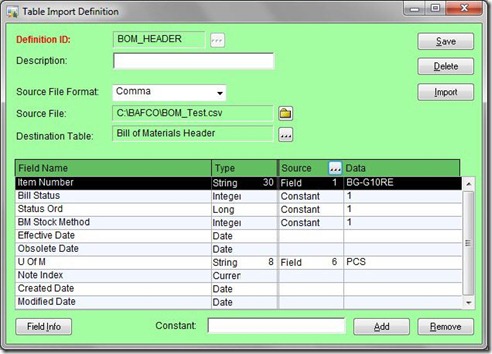
Continuing his import series, Janakiram M.P. looks at importing Inventory Bill of Materials with Table Import and adds a nice FAQ.
Janakiram M.P. shows us how to Import Kits using table import in his new post.
David Musgrave digs into techniques for Troubleshooting issues caused by customizations
Jan Harrigan shows us How to list your existing FRx reports in Excel for those of you looking into FRx replacement options.
It’s not brain surgery that when you sell an item using Sales Order Process, the sales account comes from the sales account set on the inventory item. What’s interesting is that if you enter a negative quantity, the account used is not sales, but the sales return account from the item. Sure, its intuitive when I say it now but it’s not so obvious when you’re trying to figure out where the posting account is coming from.


We've covered map integration in GP before but what if you want to turn it off completely instead of just choosing between local MapPoint and web based MapPoint? Well that's easy to do too.
Simply pick User Preference from the Shortcut Bar. In the Mapping section select "Do not display MapPoint buttons. I'm not sure why you would want to turn off maps but you can and it's easy.
I’m thrilled to announce that the Microsoft Dynamics GP 2010 Cookbook is now available in a Kindle Edition!
This makes it even easier to drag around your copy of the Microsoft Dynamics GP 2010 Cookbook for easy reference.
Dynamics competitor Sage is re-branding. ZDNet and others have coverage. In short, they are dropping product names for the 40 odd products they’ve acquired and are moving to numbers to try to build the overall Sage brand.
My take is:
The folks from Microsoft are going to Meet You There!. I’m going to meet you there.
Where is there you ask? Why Las Vegas of course for the GPUG Summit November 7-11.

The Dynamics GP Support and Service Blog has a new video up looking at Securing Word Template Documents in Dynamics GP 2010 when using Word 2010
Given the fraud possibilities of fake invoices and other documents, this is an important topic.
Christina Phillip is back with some Troubleshooting Tips and Tricks for Dynamics GP. These are great reminders.
Christina Phillips looks at Management Reporter Report Distribution Lessons Learned in her new post.
Vaidy dig into Fixed Assets Suffixes in his new post. My thoughts on the subject were covered back in my March Asset Numbering post.

If you have an interest in Business Intelligence with Dynamics GP or if you use FRx or Management Reporter you need to take a look at the BI FOCUS 2011 event from GPUG going on in Dallas in August.
This event is designed around getting the information you need out of Dynamics GP. There will be sessions on PowerPivot, FRx, Management Reporter, SSRS, Sharepoint and more.
Getting data in to Dynamics GP is great but the value comes with getting information out.
From Pam Peterson of the Dynamics GP Support and Services Blog, on of the official GP blogs, comes a Recommendation to apply the Dynamics GP 2010 June hotfix release if using Project Accounting
There are at least 15 hot fixes for Project Accounting that are resolved in the June update. Check out her post for more details.
Jivtesh catches us up on Microsoft Forecaster 7.0 Service Packs Download Links in his new post.

Aaron Berquist has written a post showing how to Use Dynamic SQL To Generate a Dynamics GP Login Macro.
In his example, he cites having to login to 150 companies to trigger the completion of 3rd party install as ‘sa’.
Thanks for the nice work Aaron.
If users see the error: “You are not allowed to enter a blank project and cost category” when trying to enter a shipment invoice, there is a simple fix for this. This is a user level setting in Project Accounting so it can behave differently for different users.

The setting is controlled in Project under Setup | User. Select a user and pick Purchasing Invoice. Check Allow blank Project and Cost Category to allow invoicing without requiring a project. A similar setting is found under Purchase Order button to control P.O.’s the same way.

Mariano digs into a Violation of PRIMARY KEY constraint 'PKSY60100' and finds that the Dynamics DB has the wrong owner.
New at MSDynamicsWorld, Paul Soski looks at ISV’s, Microsoft Partners and Why Choosing the Right Partners is Key to Microsoft Dynamics ISV Success
The Dynamics GP Support and Service Blog points us to a great video with Helpful tips when modifying Word Templates in Microsoft Dynamics GP 2010

On the latest RunAs Radio podcast, Steve Wright looks at improving the performance of Analysis Services.
All of you Analysis Cube for Excel junkies should check this out.
Vaidy back covering questions he is seeing about Smartlist Favorite Visibility.
Jan Harrigan is back with a new look at Using FRx or Management Reporter for Nonprofit Financials.
Frank Hamelly is back at MSDynamicsWorld.com with a look at Extending Microsoft Dynamics GP Manufacturing: Six Add-Ons for Process and Industry Needs.
Aaron Berquist demonstrates Using SmartList Builder With A Linked Server - It Can Be Done!
This is actually very cool and worth a look.
Yesterday the Microsoft Dynamics GP 2010 Cookbook turned one (1) year old!
I can’t believe that it’s only been a year. If you don’t have your own copy of the Cookbook or it’s Lite little brother, now is the time to get yours.
Victoria Yudin has a nice look at the various Management Reporter versions
Collins Computing appears to be as backup obsessed as I am in their 5 Easy Dynamics GP Maintenance Tips
MSDynamicsWorld.com digs into the fun of Risk Management: How to Mitigate Risk During an Audited Upgrade with Microsoft Dynamics GP in a new article.
Kelsey Andrich continues her look at what its like to be a Dynamics GP consultant in Confessions of a Young Consultant: Make Peace, Not War | Microsoft Dynamics AX, CRM & GP Blog
Sheila Ochoa of the Summit Group looks at an issue where Credit Card Information not populating in Cash Receipts Window
Gina Hoener of the Summit Group looks at more payroll tax changes, FUTA rate decreases.
If you use GP Payroll check out this post.
They like Chris and David’s Microsoft Dynamics GP 2010 Reporting book at Q Factor’s Blog.
You will too.
Sivakumar has updated his Payables HATB Script.
Congratulations to new Microsoft Dynamics GP MVP, Jivtesh Singh. A number of us have pushed for Jivtesh to be a Dynamics GP MVP but sometimes the process takes a while so it’s great to see it happen.
Also congrats to Frank and Mariano on re-awards of their MVP status.

Microsoft Dynamics GP includes a Process Monitor for users to figure out what’s going on. For example, if a user fires off a pile of batch postings and then runs a report, the report can be slow to appear to appear because it will run after the postings finish.
To check what processes are running in Dynamics GP pick the Microsoft Dynamics GP menu then Process Monitor.