31 August 2009

Macros in Dynamics GP

Over at the DynamicsCare blog, Amy Walsh has great new post up on using Macros in Dynamics GP. She includes links to practice macros to make creating your first macro easier.

Service Pack 4 - Trench Warfare?

In a new post, Mariano takes a look at the just released Service Pack 4. Make sure to take a look at
Applying Microsoft Dynamics GP v10 service pack 4: Tales from the trench.

Where in the World is Mariano?

If you can't get enough of Mariano Gomez, the Dynamics GP Blogster, now there are even More ways to follow The Dynamics GP Blogster.

How to Blow Your Implementation Budget

The ERP Software Blog has a new post up with the mouth filling title: How to Insure That Your Microsoft Dynamics GP Implementation Will Cost More Than You Planned (or How to Blow your ERP Budget in 6 Easy Steps): PART I.

Whew! I hope they budgeted enough words for that title! But seriously, the points are valid and too many people ignore them.

Logging Scripts in Dynamics GP

I keep meaning to post a link to Dan Sionov's post on Logging scripts in Dynamics GP. Well now, I've remembered so here it is!

Weekly Dynamic: Speed Up the Receivables Aging Process

The Receivables Aging process in GP can take some time if you have a lot of outstanding AR. There is an easy way to speed it up though. When running the receivables aging process (Sales on Navigation Bar, Pick Aging under Routines) select the No Report option. This means that the aging code can run without having to compile all that data into a report. Let's face, if you have a large number of outstanding receivables, you don't want to work off a monster aging report anyway. You'll re-run it and limit the results to be better aligned with your collection efforts. So save some time and turn off the report.


28 August 2009

Sales Tax Simplified

Christina Phillips has another new post up at Dynamics GP Land titled Sales Tax Simplified. In it, she takes a look at using Sales Tax in Dynamics GP.


Forecaster Users

In a new post, Christina Phillips takes a look at issues when trying to use the same user ID's for Forecaster and Dynamics GP in her new post Forecaster Users and Dynamics GP Users up now at Dynamics GP Land.

27 August 2009

Microsoft MVP Award Questions

People often have questions about Microsoft's MVP program and there's a great new post up at The Microsoft MVP Award Program Blog explaining what it is.

Dynamics GP Tips for Everyone

We had more than 90 people attend yesterday's webinar and more partners are picking up on the tips idea. For example, Total Accounting Solutions is using the idea of short, fast tips to deliver lunch and learn sessions for their clients. As an added bonus, two of the sessions are available online, free of charge, through September.

If you want to get in on one of these, they are holding another one on Friday, August 27 covering GL Tips. That would be tomorrow so hurry! Follow the links for more information.


Consulting Excellence : Objective Internal Measures

Dwight Specht takes a look at Consulting Excellence: Objective Internal Measures in his newest post at The Death of Reason. This is the start of a multi-part series on consultant measurement.

Weekly Review: That Little Security Checkbox

Lots of people know this but it will still get you. You MUST check the Security checkbox in Tools-Setup-Company-Company if you want security to be active. Otherwise, all that security work you did is irrelevant.

What is this good for? Well, you might turn security off for a test company to allow freer testing. Or, you might want security off while you build some initial settings. Generally, though you want this turned on!

Posted by Mark 10/28/2005 12:48:00 PM


26 August 2009

Bad Clients

Dwight Specht is back at The Death of Reason with the flip side of consultant performance, client performance. Make sure you take a look at his post Bad Client! Bad, Bad Client!

25 August 2009

Failure Despite Doing Your Job

Dwight Specht is back looking at when we fail, despite thinking that we did everything right, in his latest post "I did my job - Yeah, but we suck". Head on over to The Death of Reason and read up.

Creating External Shortcuts with Parameters

David Musgrave covers how to create external shortcuts (on the shortcut bar or via Quick Links) with parameters. This is a great little tip, thanks David!

Dynamics GP 10 Service Pack 4 is Out

Service Pack 4 for Dynamics GP 10 is now available at https://mbs.microsoft.com/customersource/downloads/servicepacks/MDGP10_ServicePack4.htm. Developing for Dynamics GP and other sites have additional coverage and links to the specific benefits of SP4.


Microsoft Forecaster 7 vs. Excel

My colleague Amy Walsh is back comparing Microsoft Forecaster 7 with Excel for Budgeting in Dynamics GP. If you're looking for a budgeting solution, make sure that you read this post.

24 August 2009

Send to PDF Grayed Out

DynamicsBlogger takes a look at the common scenario of the Send To Mail Recipient (PDF) being grayed out. He explains why making this work in Dynamics GP is harder than it looks and how GP 11 will be better.

50 Dynamics GP Tips in 50 Minutes Webinar - August 26, '09

If you missed the 50 Tips in 50 Minutes presentation at Convergence here is one more chance to see it. I'll be presenting it as a free webinar on Wednesday, August 26th, 2009 at noon eastern. This is a fast-paced, fun set of tips for Dynamics GP. Even if you've downloaded the slides, it's worth seeing for my witty delivery.

Visit this link for more information and registration.

I'm working on a whole new set of 50 tips for iSight, I.B.I.S.' customer conference, September 15th and 16th so this review is a nice warm up before I drop the new tips on everyone. If you're interested in iSight the link for more information is here.

P.O. Commitments vs. Encumbrances

What's the difference between P.O. Commitments and Encumbrances? The DynamicsBlogger takes a look in his newest post.

Weekly Dynamic: Remove Orphaned My Reports Links

The My Reports section of the GP home page does a pretty good job of cleaning up after itself. If you create a report option, add it to the my reports section and then delete the report you should end up with an orphaned link. However, Dynamics GP cleans that up for you the next time you log in. But what if something goes wrong and the link doesn't get cleaned up?

In that case, break out your SQL editor and open up the SY70700 table in the Dynamics database. The My Report links are stored here and can be removed via SQL should the interface not properly clean up after itself.


21 August 2009

Dynamics GP: AA vs. MDA

Via the Dynamics GP Newsgroup, Charles Allen points us to this Comparison of the features of Analytical Accounting and of Multidimensional Analysis in Microsoft Dynamics GP available on CustomerSource.

Dynamics GP 10 Standard vs. Actual Costing

Merit Matters is starting a new series of blog posts looking at the differences between standard and actual costing in Dynamics GP. The first post is up at Costing in Dynamics GP 10.0: Standard vs. Actual Costing with more promised.

20 August 2009

International ACH Functionality for Dynamics GP 10

In his new post on International ACH Transaction (IAT) functionality for Microsoft Dynamics GP 10.0, MVP Mariano Gomez gives us some information on improved international ACH functionality due in the soon to be released Service Pack 4.

How to Install Dynamics GP VBA Addons

Make sure that you take a look at Matt Landis' new post up at Dynamics Small Business. He explains How To Install Dynamics GP VBA Addon. If you don't know how to do this, Matt provides step by step instructions.

Weekly Review: Batch Transactions

In most of the batches in Great Plains, when you are working with a batch there is a big transaction button in the lower right. The logical conclusion most people come to is that this brings you to the first transation in the batch you have listed.

Nope. Wong. Nada. Nyet. Fooled you again.

I don't know WHY they didn't make it work this way, but they didn't. The actual behavior is that is takes you to a new record, at the END of the batch you have listed. But, this can get you where your want to go. You can:

1) Click the Transaction button and work your way backward through a batch of transactions.

2) Select the batch right BEFORE the batch you want, click the Transaction button. Click the forward arrow and move forward through the batch. The batch will change you the next batch (the batch you want) and you are off and running.

All of this assumes your sort type at the bottom is set to Batch ID. Sometimes it just helps to know you're not crazy and they didn't design they way you would have.

Originally Posted by Mark 10/18/2005 01:23:00 PM


19 August 2009

Microsoft's Dynamics Vertical Focus

>New on The Death of Reason Blog, Curtis Beebe takes a look at Microsoft's vertical focus for it's Dynamics line of products. He dissects why it works for Microsoft, but not necessarily for partners. Yeah, we'll call this one a must read.

Country Codes in Dynamics GP

My colleague, Amy Walsh, has a new post up on the the use of Country Codes in Dynamics GP on the DynamicsCare blog. In the post she takes a look at international standards on company codes and how they can be used within Dynamics GP.

Version 10 Windows

One of the biggest changes for version 10 was the adoption of independent windows. Windows now operated outside the main background window. This caused some consternation among GP users and a yes a few users got really wound up about. Ultimately, I think it was a change for the better. Now David Musgrave gives us an explanation of why the change was made to Version 10.0 and its individual windows.

Clustering Dynamics GP

New from the DynamicsBlogger is nice post on using Microsoft Dynamics GP on a Cluster Environment.

Creating a Keyboard Shortcut for a Dynamics GP Window Expansion Button

Up new at the Dynamics GP Blogster, Mariano has a post on Creating a keyboard shortcut for a Microsoft Dynamics GP window expansion button with VBA.

18 August 2009

SQL Maintenance Blooper

The DynamicsBlogger gives us a great example of how dangerous SQL maintenance can be in his new post: SQL Maintenance blooper.

Microsoft Dynamics GP Technical Conference 2009

Coming for Partners November 9-11, 2009 is the  Microsoft Dynamics GP Technical Conference 2009. This is a great place to send consultants and developers to improve their skills with Dynamics GP. In a nice twist of fate, the conference isn't scheduled for February either.

US Payroll Tax Update

Up now at the The Dynamics GP Blogster is information about the latest  US Payroll Tax Update along with the steps you can take to automate payroll tax updates in Dynamics GP.

17 August 2009

FRx Class, Atlanta Area, September 21-22, 2009

If you're looking for FRx training, I.B.I.S. is holding a two day workshop on FRx taught by one of my colleagues. The class is Norcross, near Atlanta, on September 21-22, 2009. You can get more information here.

Free Add On: Email Address in Customer Maintenance

We all like free so here's is a new, free add on for Dynamics GP that puts a customer's  Email Address Right on the Customer Maintenance Window.

Funny Looking Lookups

In a new post on an old topic, David Musgrave takes on funny looking lookup windows. This can happen when lookups revert back to non-smartlist based lookup windows due to a security change. Find out details at Why do my Lookup windows look different?

Expanding Payroll

Christina Phillips at Dynamics GP Land takes a look at payroll options and add on in her Ever Expanding Payroll System post.

General Posting Journals in Subsidiary Modules

DynamicsBlogger takes a look at a way to print GL Posting reports for direct GL transactions but not those posted through sub ledgers in his new post General Posting Journal in Subsidiary Modules.

Do You Know...Data Mining Add Ins?

Inside Microsoft Dynamics GP takes a look at data mining in this weeks edition, specifically the new data mining add ins. These are definitely worth a look.

Weekly Dynamic: Prevent the Sale of Discontinued Items

In Dynamics GP users can discontinue items in Inventory. Discontinued items can still be sold but not bought. This gives companies the options to work through obsolete inventory. But sometimes companies don't want to be able to sell discontinued items. There could be safety issues or contractual reasons behind this. The typical solution is to write off discontinued items removing the balance from being available for sale. This has it's pitfalls too. Another solution is to turn off the ability to sell discontinued items. The switch for this is located at Tools->Setup->Sales->Sales Order Processing, Options. Uncheck Allow Sales of Discontinued Items in the bottom grid area.

This is a system wide switch so if you only want to prevent the sale of certain discontinued items you'll need to continue to zero out the inventory for those items. But if you want to prevent the sale of discontinued items across the board, now you've got an easy way to do it.


14 August 2009

Go to the GPUG Summit!

In case you've missed it, the GPUG Summit is only about a month away. This is the largest independent gathering of Microsoft Dynamics GP users. The event is focused on training and continued education around Dynamics GP. For companies, this provides an opportunity to improve the efficiency of their accounting staff. Staff cuts mean that everyone has to get a little better at their job and this a great way to learn how to do that. It's also a way to get the tools to provide better insight on how to run your business. For users, this is a chance to learn, share ideas and figure out how to get more done with Dynamics GP in less time.

Don't buy any excuses that the money isn't in the budget. Take it from a former CFO, the little secret is that the budget is always flexible for the right employee and the right event. You may have to skimp on a hotel and flights but your firm has the money if you make the right case. As an example,
balance the cost of the summit against the cost of consultants. You'll find the Summit provides a great Return on Investment.


13 August 2009

XBRL US GAAP Tags Now Aligned to FASB Accounting Codification

From the Journal of Accountancy, if you're using XBRL tags with FRx, the tags have been updated to support FASB's new GAAP codification project. If you don't know what I'm talking about, don't worry about it. If you do, you'll care.

Color Coding IM Scripts?

In another new post, Mariano Gomez takes on color coding in Integration Manager scripts.

Dex SQL Errors 5701& 5703

David Musgrave has a new post up looking at errors 5701 and 5703 that can appear in the Dex SQL Logs.

Dynamics GP Network Encryption

Over at the Dynamics GP Blogster, Mariano has a new post up on using network data encryption with Dynamics GP.

Weekly Review: Setting Up Users Without SA

In v8.0 and higher you can add users to Great Plains without being logged in as SA. Unlike previous versions, there is an option to create Non-SA administrators and get some separation between database and application security.

From page 27 of the MBS Planning for Security in Great Plains guide:

2. Assign the specific Great Plains administrator(s) SQL login account to the SysAdmin fixed serverrole using SQL Server Enterprise Manager.

So by assigning and existing GP user to the System Admin role in Enterprise Manager they can add users without being SA.

The full document can be found at https://mbs.microsoft.com/downloads/customer/GreatPlainsSecurity.pdf if you're a customersource member.

Is this perfect, no. It requires a SQL security setting and most likely, the help of your resident DBA. Also, the user would still have elevated access to the underlying SQL tables. BUT they wouldn't have access to non-GP databases on the same server. So the control is at least restricted to within Great Plains, whereas giving SA access, gives System Administrator access to any databases on that server installation.

Originally Posted by Mark 10/17/2005 05:55:00 PM

12 August 2009

The Microsoft Dynamics UnRuly Ladies

David Musgrave and a number of other bloggers have highlighted the UnRuly Lades of Dynamics GP. Based on the blog posts, the UnRuly Ladies are designed to provide a level of support and resources for partners beyond the Knowledge Base. Their job is to help untie the knots of unresolved items. I don't have any experience with them yet but you can be sure that I'll blog it when I do. Unfortunately, this service is for partners only but it is nice to see more resources being provided. Heaven knows good partners know whose chain to yank when they really, really have an issue and adding more resource for issues like these is always better.

Green GP

Anya Ciecierski at the ERP Software Blog discusses ways to track your company's environment impact and improvements using Microsoft Dynamics GP. I had a hand in writing Microsoft's guidance on going green for Dynamics GP and it's nice to see others picking up the banner as well.

SQL View for all Posted GL Transactions

Victoria Yudin has a great post up SQL code designed to show all posted GL Transactions in GP. This is very useful for reporting.

Dynamics GP Test Drive

DynamicsBlogger Janakiram has a blog post up describing how online GP testing site, Dynamicsgptestdrive.com saved his day. That's the second time that Dynamics GP Test Drive has come up for me this week, a colleague called me about it as well. If you want to play with stuff in GP and you don't have the VPC image or a test site installed, this is a great option.

Storage Planning for Imaging

MSDynamicsWorld has a new article up discussing planning requirements for moving from paper based storage to imaging. Definitely worth a look if you're looking at moving away from paper to online storage.

Long Account Numbers

The DynamicsBlogger has run into the issues that can happen when using really long account numbers in Dynamics GP. I'm having trouble leaving a comment so I'll comment here. The key is to turn on Horizontal Scrolling in User Preference. Detailed information on issues I've seen with long account numbers is here: http://msdynamicsgp.blogspot.com/2006/08/weekly-dynamic-long-account-number.html

Connections Conference

Partners, don't miss the Connections Conference coming up in September. There are fewer opportunities today for partners to cross pollinate ideas and share skills. In today's challenging environment, effective sales and delivery skills are critical and the Connections Conference can help deliver those critical skills. There's going to be some great session by some terrific speakers. Many of the speakers are folks that I know personally and have always been impressed by their knowledge of Dynamics GP. If you want to grow your business, go. If not, what are you doing in business?

Dashboard Design

Inside Microsoft Business Intelligence has a new post up highlighting the Enterprise Dashboard blog site. They provide dashboard examples and styles. If you're looking to create a dashboard, say with Analysis Cubes for Dynamics GP and Microsoft Excel, you can get some great layout and information ideas from this site.

Taming the Dynamics GP Toolbar

Let's say you get used to where all the icons are in the Dynamics GP toolbar. You lock the toolbar so secure it against changes. Then one day, all the icons move around. Did the toolbar fairy unlock your toolbar and move stuff around? Probably not, unless the toolbar fairy is the Script Debugging Tool or Report Writer or Modifer. Mariano has more coverage of this issue and some solutions to put stuff back where it belongs. Thanks Mariano for helping us tame the toolbar!

Open Operation on Table Errors

David Musgrave has a new post up at Developing for Dynamics GP covering unusual errors that can happen with temp table.

10 August 2009

FRx Q&A

DynamicsBlogger rounds things out today with a nice FRx Q&A post.

Error: Posting to Table POP30310

There's a new post up at DynamicsBlogger covering a an error in the posting journal that looks like this: Error: Posting to table POP30310. Restore from a backup if possible


Getting Started with VST in GP

Mariano Gomez has post number 2 up in his series on Getting Started with Visual Studio Tools in Dynamics GP. In post 2 he tackles WinForms and Controls. If you are looking to get started with VST in Dynamics GP make sure you spend some time with Mariano's series.

Controlling GP with C#

Dan Sionov at the accountingBot Blog has a post covering controlling GP using C#.

Dynamic.set File Common Error

Vaidy Mohan is back blogging again with a new post on the Dynamics.set file and common errors that can occur when fiddling with this file.

Dynamics GP Troubleshooting

Purchasing Improvements

Gloria has a new post up at ComputerationDynamics. She talks about some of the improvements in Purchasing that she's found her as she moves from doing v9.0 work to spending more time in v10.0

Option Explicit in VBA

It's gonna be a full day of GP related posts. I've got a bunch to catch up with from late last week so buckle up! First up is David Musgrave's post on Option Explicit and what it does in VBA.

Weekly Dynamic: Tax Date on Transactions

Another nice feature that is NOT enabled by default is the ability to add a tax date to a transaction. Perhaps the nature of the transaction is that the sales tax actually belongs in the previous or next period. Wouldn't it be nice to specify a tax date instead of having to rely on the transaction date? Well you can.

In Company Setup Options (Tools->Setup->Company->Company, Options) there is check box marked "Enable Tax Date". Simply select this and hit ok.


Now a tax date field is enabled in Sales, Purchasing and other parts of the system. Attached is a sample of what the tax date looks like on a Sales Transaction.


06 August 2009

Weekly Review: Excel-ing with Smartlists

If you've used Great Plains for 5 minutes you've figured out how to export a Smartlist to Excel. Great feature, simple interface, push the button. But... there is another dimension to Smartlists and Excel that we're going to explore.

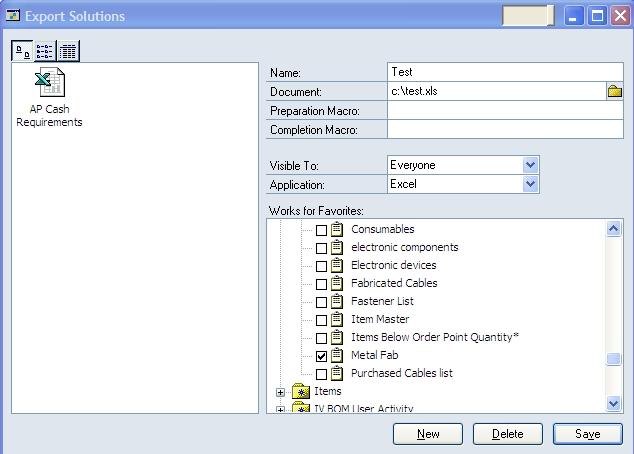
With a Smartlist open, pick Extras->Smartlist->Export Solutions to see what I'm talking about. Smartlist allows you to export to the SAME Excel spreadsheet time after time. You can also specify Excel macros to run before and/or after the export for formatting, analysis, etc.

Maybe you export data to Excel every month for graphing, analysis, etc. This feature lets you automate the process.

So how does it work?

1) First, save your smartlist as a favorite.
2) With a Smartlist open, pick Smartlist->Export Solutions.
3) Give the Smartlist a name, add your Excel file name and your before and/or after macro names. In "Visibility" set who can see this favorite and select Excel for the application.
4) In the tree view at the bottom, select your favorite and check the box
5) Click save.


Close the window. Close and Reopen Smartlists.

Pick the favorite you just saved and click Excel. You'll see two choices now, the saved export solution you just created and Quick Export. Quick Export is the normal "send to Excel with a new sheet" functionality you're used to. If you click your new favorite, your spreadsheet opens, your before macro runs, the data imports and your after macro runs.

This great for when you want to send data to same Excel file on a monthly basis. You can use a macro to move to the bottom or create a new tab, import the data, and reset a graph with an after macro.

Ideally, you would do a normal export first. Play with your Excel file and macros a couple times to get them where you want, and then setup the export solution.

Originally posted 10/6/05

05 August 2009

Support Debugging Tool FAQ

David Musgrave has built a set of Frequently Asked Questions for the Dynamics GP Support Debugging tool. Make sure you check this out. I've finally gotten some time with the Debugging tools and it's got some great features.

Dynamics GP 10 Already Compatible with Windows 7

Unlike some of the issues with Vista's release, when you can get your hands on Windows 7, Dynamics GP 10 will already be compatible. Inside Microsoft Dynamics GP has the official scoop. Unfortunately, there are no compatibility plans for  versions 9 or earlier. I have no idea if 9.0 will actually run on Win7 but not be supported or if it simply won't run. Then there's the whole question of the new XP Compatibility mode feature still in beta. You may be able run GP on that. Either way, I'm excited about Window 7 and will grab the RTM as soon as it's available to me.