You, Me and Dynamics GP
The premier information site for Microsoft Dynamics GP
31 December 2009
Using Excel Charts and BI

Microsoft BI Conference

Stop Unexpected Transaction Growth in SQL

Get the YTD Account Balance in GP via SQL

Dynamics GP Blogster's 2009 Top 10
Weekly Review: Dynamics GP Map Functionality
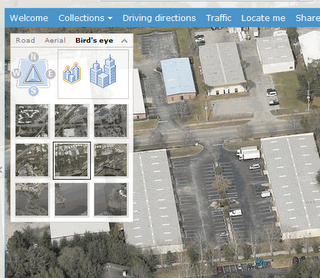
On a variety of forms you'll see a small yellow and green push pin icon next to an address ID. Clicking this takes you to Windows Live local maps powered by Virtual Earth. In most cases you get a map, and ariel view and often the ability to see the location just above street level.
It's one thing to give your delivery guys a map. It's a whole new twist when you can give them ariel photos with landmarks around their destination!
30 December 2009
Dynamics GP Integration Manager Pain

Custom VBA Lookups in Dynamics GP

29 December 2009
New Year End Webinar 1/5/10

Top 5 DynamicAccounting.net Posts of 2009
GP 11 Sneak Peek...the Beginning of Report Writer's End.
Apparently a lot of folks will not be sad to see Report Writer go. Unfortunately, it will still be there in version 11.Weekly Dynamic: Module Homepages in Dynamics GP 10
As folks upgraded to v10, the original v10 posts from way back in 2008 gained more viewersWeekly Dynamic:Excel Reports in Dynamics GP 10
It's no surprise that Excel reports showed up in the top 10. They are easy to deploy and incredibly powerful.Crystal Reports vs. SQL Server Reporting Services
Crystal vs. SSRS is one of those "it depends" questions in the short run but in the long run, SSRS is the winner.Dynamics GP 10 Service Pack 2 is Out!
This post from 2008 was a surprise. I can only assume it was viewed by people who upgraded in 2009 and went looking for Service Pack 2
Weekly Dynamic: Budget Wizard Bug in GP10
This was so close to number 5 that I wanted to highlight it. Hundreds of people got an answer to a budget wizard bug last year from DynamicAccounitng.net.
28 December 2009
Job Candidate for Tampa Area

Fix for Smartlist Builder Permission Issues

Dynamics GP Land Looks at Table Import

More New Items at DynamicAccounting.net
What's new:
- Daily Tips. Frank Hamelly's daily tips have been added to the front page of the site
- Newsletter! Sign up to get more Dynamics GP goodness delivered to your inbox monthly
- Tag Cloud. The old listing of tags has been replaced by a much cooler cloud where larger items have more posts
- Cleaner look. The right side has been cleaned up significantly to make navigation easier
- Improved tags. Tags are being reworked to provide faster links to information
- Book. My book on Dynamics GP is due out in 2010. More details to come.
- More Analytics and Excel information related to Dynamics GP
- More Accounting and Admin information related to Dynamics GP
- Full coverage of the release of Dynamics GP 11 and everything that goes with it
- Secret stuff I can't talk about yet
- Weekly Dynamics. The weekly tips continue to help you improve you solution
- Weekly Reviews. Highlights of past Weekly Dynamics have become a favorite and there are plenty more to go around

Weekly Dynamic: SOP Quick Print
There's a setup for Quick Print also under the options menu to control how Quick Print works. So what are you waiting for? Get printing!

24 December 2009
Merry Christmas!

Dynamics GP Analytical Accounting Primary Key Script

Dynamics GP and Password Expiration Warning

Weekly Review: Custom Links
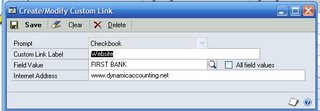
Custom links are setup in Tools-Setup-Company-Custom Link.
- Click New to add a link
- Select the item to add a link to. For demo purposes, pick checkbooks
- Give the link a description like "Website"
- Pick an associated item, in this case a bank account
- Enter the link. You don't have to enter Http://. You can just enter the address like www. dynamicaccounting.net.

This works well for things like bank websites, currency sites, vendor sites, etc. It's more universal than a shortcut and easier to make available to everyone.
23 December 2009
DynamicAccounting.net Now has a Facebook Name!
The Facebook fan page is getting some exclusive content pieces like the new poll on whether you are going to Convergence. So join the movement, become a fan now.

The New DynamicAccounting.net is Up!
One of the additions is a sign up sheet for my new monthly newsletter. I'm launching a newsletter to reach even more of the Dynamics GP community with ways to improve their solution. So please sign up! This list is only for the newsletter, no selling, renting, etc. of names.
There is a lot of exciting things coming next including full coverage of the release of Dynamics GP 11 and more ways to improve versions 9 and 10. Make sure you're following DynAcctNet to get the most out of Dynamics GP.

Four Myths About Dynamics GP Integration Manager

22 December 2009
2010 EU Tax Changes and Updates

New Podcast Episode is Up!

21 December 2009
Recording an Unused Check in Dynamics GP

Manufacturing Accounting Entries in GP
Resources for the new Power Pivot

Dynamics GP - Splitting SOP Batches

New Add on to Unite Bing and Dynamics GP

MSDynamicsWorld Top 10 Microsoft Dynamics Stories of 2009

FRx 6.7 SP 11 Pulled Due to Bug?

SQLServerCentral.com has SSRS Expression Tips

Weekly Dynamic: Match 1 or More in Smartlists
However, sometimes users need to see records that meet one of the criteria. They want to see any transactions on 1/1/09 or 1/5/09 or 1/31/09 but nothing else. The Search Type of Match 1 or More changes Smartlist searches to an "Or" type search. If any one of the criteria are found, the record is included. However, this doesn't work when trying to search for all Invoices on those three dates since the search will look for any transaction that is an invoice, any transaction on 1/1/09, any transaction on 1/5/09, etc.
Next time we'll look at the options for overcoming limitations of both Match All and Match 1 or More

18 December 2009
Backing Out a Journal Entry

Development: Testing Date Driven Features in GP

Q&A on Requisition Management, MOSS 2007 and WSS

How to Reprint a GL Posting Journal

DynamicsWorld UK Interview with Mariano Gomez

New Poll: Are you going to Convergence

17 December 2009
eOne Looks at Eating Your Own Dynamics GP Dog Food

Sure Step 2010 Now Available

Demand Planner Discontinued

Weekly Review: Auto Populate Account Description
Dynamics GP v9.0 introduced a new feature to allow you to automatically populate the account description based on the segments. This is a great feature to give you a consistent chart of accounts.
In a nutshell, once you've setup your account segments and their meanings in Tools-Setup-Financial-Segment you're ready to go. There is supposed to be a way to add these on the fly as well but I haven't found it yet.
After this, when you create a new account in Cards-Financial-Account, the description will populated based on the segments. So if your account is 0000-1100-01 and the segment meanings are Cash-Bob's Bank-Operating, that's what will apear in the description. It takes alot of the guess work out of abbreviations.
For those of you with messy charts descriptions like me, Mass Modify (Cards-Financial-Mass Modify) will let you clean up your Segments now as well.

Originally Posted by Mark 7/06/2006 10:24:00 AM

16 December 2009
Are you a DynamicAccounting.net Fan?

Developing for Dynamics GP digs up the Past

Payroll Year End Close and W-2's

Resolution for SOP "This document has been posted" Error