Luc Van Vugt looks at Why is MS asking me to help improve PartnerSource/CustomerSource? He is a Dynamics NAV specialist but PartnerSource/CustomerSource is the same for all of us. I think that it is slowly, slightly getting better but not nearly at the pace it needs to. For Dynamics GP now you’ve got My GP Search as option to solve GP issues as well.
 You, Me and Dynamics GP
The premier information site for Microsoft Dynamics GP

31 January 2011
Dynamics GP Land: eConnect 10: Connection Pool Timeout Error caused by GetNextGLJournalEntryNumber
Steve Endow digs into eConnect 10: Connection Pool Timeout Error caused by GetNextGLJournalEntryNumber over at Dynamics GP Land


Belinda, the GP CSI: Start with paper...
Belina Allen reminds us to Start with paper... when designing FRx reports. I would add that this is a good idea for any report. If you can mock it up on paper it’s much easier to get the finished product right and flesh out issues before the report is created.
The eOne Dynamics GP and CRM Blog: Folder Feedback
eOne looks at folder sources in SmartConnect. This is a feature that I really like as well but I would love to see it expanded. Currently it only works for Excel and CSV files. I would love to see available for other types of files. Learn more at The eOne Dynamics GP and CRM Blog: Folder Feedback
Are you currently using Management Reporter? Would you like to have your business showcased in a session at Convergence 2011?
Dynamics Corporate Performance Management is looking for folks using Management Reporter who would like to be showcased at Convergence 2011. This is your chance to be famous. More information here:
Microsoft Dynamics® GP Deep Dive into Dex.ini | DynamicsCare
A recording of my Microsoft Dynamics® GP Deep Dive into Dex.ini webinar is now available at DynamicsCare. This webinar got a lot of positive comments.
Dynamics GP 2010 Vendor 1099 Details window |DynamicsCare
Amy Walsh tackles the Dynamics GP 2010 Vendor 1099 Details window over at DynamicsCare. On a related note, someone won a copy of the Microsoft Dynamics GP 2010 Cookbook at a recent GPUG event. Later that afternoon they wrote in to say that the book was already useful for them. They need to fix a 1099 issue and the answer was in there. Even if they had bought the book, it would have saved them consult dollars and time to get the issue fixed.
Belinda, the GP CSI: FRx Rolling Quarter Report
Belinda Allen has been running a series of videos on creating an FRx Rolling Quarter Report . Check out the whole series.
Change GP fiscal period names using SQL Server « Victoria Yudin
I was travelling on Friday so I’m behind. Let’s catch up together! Victoria Yudin starts things off with a script to Change GP fiscal period names using SQL Server .
Weekly Dynamic: Increase the number of password tries
By default in Dynamics GP, if you type your password wrong 3 times GP closes. This setting can be controlled in the Dex.ini file.
The setting is:
SQLNumLoginTries = number
The default is 3, setting this to –1 allows an unlimited number of tries. This doesn’t change any SQL based lockout parameters, it simply keeps GP from closing after 3 tries.
27 January 2011
Dynamics Confessor Blogspot: How is FICA/S wages and withholding calculated?
Leslie Vail rounds out a day of payroll with a look at How is FICA/S wages and withholding calculated?
Nominate a Customer! Customer Excellence Award Nominations open January 21 - February 7, 2011. - Inside Microsoft Dynamics GP
Customer Excellence awards totally rock. I love the fact that Microsoft celebrates the successes of their customers. Let’s face it, Apple’s never given you an award for your innovative addition of “Baby got back” to your iPod’s workout playlist. Google’s never recognized you for fine tuning that search to find just the right birthday gift for your kids. Microsoft however, may recognize for innovative implementations of Dynamics GP or for team work in pulling together to resolve complex issues. Well, the Customer Excellence Award Nominations are now open from January 21 - February 7, 2011.
DynamicsBlogger: Payables Management - Document Number appear Blank
The DynamicsBlogger pulls out of our payroll musings with a look a Payables Management - Document Number appear Blank.
Microsoft Dynamics GP US Payroll Version 10 Releases Service Pack for FICA changes and Tax Updates » Summit Group Software Blog
The Summit Group is all over the new Payroll Service Pack like auditors on an unsupported entry. Check out their look at the fix in Microsoft Dynamics GP US Payroll Version 10 Releases Service Pack for FICA changes and Tax Updates . (I would have said like fleas on a dog but I like dogs. As for auditors…well, I wouldn’t let one lick my hand.)
Dynamics Confessor Blogspot: Payroll Tax Round 2 for GP2010 for year 2011
Leslie Vail has details on the Payroll Tax Round 2 for GP2010 for year 2011. This is supposed to be the fix for the FICA issues introduced by new tax laws.
Dynamics GP Land: Don't forget your keys (and the taxable wages)!
Steve Endow tackles incorrect taxable wages in Don't forget your keys (and the taxable wages)! It looks like today is shaping up to be a payroll day here at DynamicAccounting.net
Oops..make that Christina Phillips.
Oops..make that Christina Phillips.
DynamicsBlogger: Excel Report Builder–Publish Report in GP 2010
The DynamicsBlogger has a great look at Excel Report Builder and how Publish Report in GP 2010 including information about security needed to publish Excel reports.
Weekly Review: Deleting an Auto Complete Error
We all love the Auto Complete functionality in Dynamics GP, you know that thing where you start typing and GP fills in with things you've typed before. it's like it's reading your mind. But what happens if you make a mistake and misspell something, like an employees name? Are you stuck with that misspelling forever?
No way! This is actually really easy to fix. Start typing the misspelled word and when it appears as an auto complete choice, highlight it with the mouse and right click on the misspelling. A box will pop up showing "Remove from list". Click on that and the entry will go away.
That's all that there is to it.
This was actually covered as part of the Weekly Dynamic on the Auto Complete function but a number of people weren't aware that you could do this so I decided to split it out and give it it's own Weekly Dynamic.
originally Posted by Mark at 11/17/2008 09:00:00 AM
26 January 2011
Five Tools that Microsoft Should Quit Charging For in Microsoft Dynamics GP
I’m back with an article at MSDynamicsWorld. This time I look at Five Tools that Microsoft Should Quit Charging For in Microsoft Dynamics GP . Tell me what you think.
Announcing the Launch of MyGPSearch.com for finding help with Dynamics GP!
I’m thrilled to announce the launch of a new custom search engine, MyGPSearch, designed to help you find support information for Microsoft Dynamics GP. I’ve collected more than a hundred Dynamics GP resources representing tens of thousands of articles, blogs, posts, videos and support cases, all related to Dynamics GP. Plus, the number of resources continues to grow.
 It’s launching today with:

 Next time you get stuck on a Dynamics GP issue, don’t wade through unrelated articles like wheat production on the great plains or dynamic drive technology. Get a targeted search with MyGPSearch. If you’re out of the office when a issue come in, pull out your phone and hit up m.mygpsearch.com or the dedicated Android app and solve the problem from your kid’s soccer game.
The interface is designed to be clean and easy to use. It’s more like Google or Bing than Yahoo, MyGPSearch is designed for you to get in, get answers and go home. Try it out today!
ps. If you have a website, blog, videos, twitter feed or other resource designed to help GP users, not just promote your company, and you want to make sure that it's included in the search engine, send me an email. It's on the main page of DynamicAccounting.net.
- A website at http://www.mygpsearch.com/
- A mobile site at http:///m.mygpsearch.com
- An Android app available in the Android Market.
The interface is designed to be clean and easy to use. It’s more like Google or Bing than Yahoo, MyGPSearch is designed for you to get in, get answers and go home. Try it out today!
ps. If you have a website, blog, videos, twitter feed or other resource designed to help GP users, not just promote your company, and you want to make sure that it's included in the search engine, send me an email. It's on the main page of DynamicAccounting.net.
25 January 2011
SQL Server Backup and Maintenance Solution - andy.nifong
Andy Nifong points out his choice for an Excellent SQL Server Backup and Maintenance Solution . I’ll add this to the list to check out. Thanks Andy.
Report Writer Series: Don’t settle for ugly reports! Part 2
Kuntz Consulting reminds us that beautiful people like us Don’t settle for ugly reports! Part 2.
The New Gold: How is the New MPN Affecting You?
Dwight Specht pans for gold certification in the new Microsoft Partner Network requirements. Partners, how is the New MPN Affecting You?
Dynamics Confessor Blogspot: Change the Date at Midnight without the Dialog
Just in time for my Deep Dive into the Dex.ini webinar today, Leslie Vail looks a how to Change the Date at Midnight without the Dialog
24 January 2011
The eOne Dynamics GP and CRM Blog: Repellant
Martin from eOne takes a look at how we can avoid repelling our customers in The eOne Dynamics GP and CRM Blog: Repellant. This post is more partner or ISV focused but also applicable to a general audience.
If I’m repellant to you I’m sorry. I really did shower.
Review: Dynamics GP 2010 Implementation by Victoria Yudin
Make sure to check out Aaron Berquist’s review of Dynamics GP 2010 Implementation by Victoria Yudin.
Send To E-Mail Problem with Office Outlook 2010
The DynamicsBlogger tackles Send To E-Mail Problem with Office Outlook 2010 with Dynamics GP in a new post.
Weekly Dynamic: Droid Does
This Weekly Dynamic is a little different. It’s different because you can read it on your Android powered phone! I’ve built a DynamicAccounting.net Android app to help you keep up with everything Dynamics GP related. The app is available in the Android Marketplace for $0.99. To get it you can search the Android Marketplace for DynamicAccounting.net, use the AppBrain link at http://www.appbrain.com/app/dynamicaccounting-net/com.dreamstep.wDynamicAccounting_net or scan the bar code below from your phone.
 |  |
21 January 2011
Another Review of Victoria’s Book
Vaidy has a new review up of Victoria Yudin's Book. Hint, he likes it too.
Confessions of a Public Speaker ebook $6.99 today only
Just in time for those of you warming up to speak at Convergence in April, the ebook version of Scott Berkun’s fantastic Confessions of a Public Speaker is available for $6.99 today only from O’reilly.
Simple Customizations
imtiaz is back with a look at how easy it is to do Simple Customizations in Dynamics GP.
Microsoft Dynamics Convergence 2011 sessions are now out!
I’m all excited about presenting again at Convergence this year. You can check out all of the sessions in session catalog. I’m doing a new set of 50 Tips because frankly, you just can’t seem to get enough. Additionally, I’m going to tackle some very cool things that you can do with Excel and Dynamics GP. This one of my favorite topic areas so I’m working hard on a great presentation.

Finally, fellow MVP Frank Hamelly and I will be presenting at Day One presented by GPUG. This is Sunday, the first day of Convergence. From now on we’ll be the presentation duo known as FrankenMark.
Mariano also has a look at his session in a new post Microsoft Dynamics Convergence 2011 sessions are now out!
20 January 2011
Five Ingredients for a Successful Convergence Atlanta 2011 Experience
In his new MSDynamicsWorld article Mariano looks at Five Ingredients for a Successful Convergence Atlanta 2011 Experience. I’m looking forward to seeing all of you in Atlanta this year.
Microsoft Dynamics® GP ISV Spotlight – Enliven Software
I.B.I.S.’s Microsoft Dynamics® GP ISV Spotlight on Enliven Software webinar is now up. Eliven has a great product to help manage AP and AR. They are definitely worth a look.
Excel Dashboarding in GP 2010
Writing from Pakistan, imtiaz looks at how easy Excel Dashboarding in GP 2010 can be.
Microsoft Dynamics GP Technical Conference 2011 sessions now out!
From Mariano I see that the Dynamics GP Blogster: Microsoft Dynamics GP Technical Conference 2011 sessions are now out. I won’t make the technical conference this year but I’m looking forward to hearing great things from it.
Time to Get Cooking
The Microsoft Dynamics GP 2010 Cookbook continues to be among the top 1% of all books sold on Amazon.com. Isn’t it time that you got yours?

Tame Pivot Table Sequencing
At CFO.com, Mr. Excel, Bill Jelen looks at a way to Tame Pivot Table Sequencing. Once you get data out of GP and into Excel it helps to know what to do with then.
What happens when you hit the max Journal Entry Number?
Kuntz Consulting decided to look at What happens when you hit the max Journal Entry Number in Dynamics GP. No, it doesn’t break.
19 January 2011
Microsoft Dynamics GP Flash Report
Writing in MSDynamicsWorld, Gloria Braunschweig looks at creating a Microsoft Dynamics GP Flash Report. I’ve use similar reports, often emailed automatically, when I was a controller.
Adjusting the print on W-2s or 1099s
Continue there payroll related postings, The Summit Group looks at Adjusting the print on W-2s or 1099s.
Changing and Copying a Home Page Role - Part 2
Mariano has posted his follow up looking at Changing and Copying a Home Page Role .
Due to client constraints on running SQL scripts, Mariano had to use the SQL Debugging Tool’s XML import and export features. It’s a great read, make sure to check it out.
What to do if you overpay an employee in Dynamics GP
The Summit Group looks at the options if you’ve Overpaid an Employee in Microsoft Dynamics GP
Are we rewarding our teams the wrong way?
Up now at The Death of Reason, Dwight Specht is back with a partner focused blog wondering Are we rewarding our teams the wrong way?
18 January 2011
Popular Payroll Year End Questions
Courtesy of Microsoft’s webinar on the subject, Christina Phillips also digs into Popular Payroll Year End Questions.
Confused about the Microsoft Dynamics GP Payroll tax updates?
The Summit Group continues to dig into GP Payroll Tax updates and FICA issues with Confused about the Microsoft Dynamics GP Payroll tax updates?
Don’t settle for ugly reports! Part 1
Kuntz Consulting leads us back into the land of Report Writer with their new post Don’t settle for ugly reports! Part 1
Changing and Copying a Home Page Role - Part 1
Mariano looks at the basics of Changing and Copying a Home Page Role in part 1 of a short series he’s doing on that subject.
No CPE at Convergence this Year
I seem to be the only blogger who cares about CPE, so be it. I asked if MS was offering Continuing Professional Education credits for Convergence this year as they have in the past. I was told that they will not be offering CPE.
I’m struggling with how big a deal to make over this. I know that it makes a difference for accountants. I’ve talked to plenty of accountants who use Convergence to learn about GP and help fulfill education requirements. I’m one of them. I don’t want you to skip Convergence because they are not offering CPE this year. There is too much good stuff planned. Heck, I’ve got too much good stuff planned for you.
I also know that IT folks and non-CPA accountants don’t care.They tell me that too.
So if you want CPE back at Convergence you need to do a couple of things:
- Drop me a note, attach a comment, etc.. If I get a pile I’ll forward them on.
- Go to Convergence anyway this year and express your desire for CPE to everyone. Put it on every evaluation for every session that you attend. Tell every MS employee that you meet.
Microsoft pays attention to evaluations. If folks don’t go, MS won’t get the message because they won’t know why you didn’t go.
Convergence, Atlanta, Food
I.B.I.S. CEO Andy Vabulas (full disclosure, Andy is known around the house as “the man who signs Daddy’s paycheck”) has a great look at where to eat in Atlanta on the MS Dynamics Community site.
We had a great time at Convergence in Atlanta last year and now that so many of you have been there, Andy’s list provides some great new options when you return. I’m looking forward to seeing you in Atlanta.
We had a great time at Convergence in Atlanta last year and now that so many of you have been there, Andy’s list provides some great new options when you return. I’m looking forward to seeing you in Atlanta.
Microsoft Dynamics GP 2010 Implementation
I finally polished off Victoria Yudin’s new book Microsoft Dynamics GP 2010 Implementation.
Victoria has written a terrific book on implementing Dynamics GP. Frequently, customers ask for the manuals as part of implementing the software. The manuals are thousands of pages long. Victorias has distilled the essential elements of implementing Dynamics GP into less than 400 page.
This book is a must for companies looking to implement Dynamics GP. It's also great for new consultants and for consultants who occasionally need an outside reference to convince help reinforce best practices when implementing Dynamics GP.
Cloud economics – the bit they don’t tell you
I got some grief for my cloud based ERP post at MSDynamicsWorld. It was clear that a number of commenters didn’t even bother to read the article. They posted things like “you focused too much on ERP”, um, yeah, that’s what I do for a living.
Now curmudgeonly commentator Dennis Howlet of AccMan, takes his own look at Cloud economics – the bit they don’t tell you. Dennis spends a lot of time looking at SAP and Sage and he’s a big proponent of cloud solutions for ERP so some his comments surprised me.
17 January 2011
Quality Customization Vs. On Time Customization
Last Friday’s funny post on development struck a chord with Vaidy as well. In a new post he looks at Quality Customization Vs. On Time Customization.
My thoughts on development and almost everything in business are very simple: You have it Fast, Cheap and Quality, pick 2.
Those are really the three key constraints. If you’re not getting at least 2 you’re getting ripped off. If you’re getting all 3, the vendor is not making a profit and probably won’t last. It’s as simple as that.
Multiple SQL Views for Analytical Accounting
Sivakumar dropped a number of Analytical Accounting related SQL items on the community over the weekend including:
- SQL View for AA Accounting Class–GL Account Link Information
- SQL View for Receivables Transactions with AA Codes
- SQL View For User–AA Code Access
All have been added to the SQL Scripts page as well.
Critical Details of 2011 Payroll Tax Changes for Microsoft Dynamics GP
Writing in MSDynamicsWorld, Gloria Braunschweig continues a look at Critical Details of 2011 Payroll Tax Changes for Microsoft Dynamics GP
Update tax table for Illinois State Income Tax rate change!
Illinois has a retroactive payroll tax hike as well. The Summit Group has info about tackling the change until Microsoft updates rates.
Update tax table for Illinois State Income Tax rate change!
One of the nice things about living in Florida, beside the weather, the theme parks and the beaches is that we have no state income tax. That also means that we don’t have to deal with retroactive state income tax changes as well.
5 Reasons to Re-Implement your Dynamics ERP
Michael Johnson looks at 5 Reasons to Re-Implement your Dynamics ERP.
I have a client going through something similar. They have been using GP successfully for the last 10 years but after multiple upgrades, they’ve stepped back and taken a hard look at features that they haven’t been using. They want to get the most out of GP and are using the upgrade to GP 2010 as a springboard to evaluate everything.
Maybe you should too?
Weekly Dynamic: Dynamics GP Passwords, Case Sensitive Logins and ODBC Connections
Yeah, the title is a little weird. Here is the background. A client was moving terminal servers. Old server and new server were both pointed to the same Dynamics GP source. Users would log in to one terminal server and everything worked fine. When they logged into the other terminal server, GP would lock and their password needed to be reset. It didn't matter which terminal server a user logged in to, the first one they logged into worked fine, the second one hung and required a password reset to use that terminal server.
I know, what does the terminal server have to do with a GP password?
Well Dynamics GP uses the User ID and the server name in the ODBC connection as part of the hash when encrypting the user password for the first time. In our case, one of the terminal servers had the SQL Server as a fully qualified domain name and one just had the server name. So the weren't exactly the same and it broke the ability to decrypt the password.
This is also why user logins are case sensitive. The ASCII characters are different for upper and lower case letters so different information is passed when encrypting upper case vs. lower case passwords for the first time.
To solve our little problem we made both server names identical in the ODBC setup and then we reset the passwords of the affected users.
Huge thanks to Rob Mitchell of I.B.I.S. for the background behind this. He is the one who actually solved this issue.
I know, what does the terminal server have to do with a GP password?
Well Dynamics GP uses the User ID and the server name in the ODBC connection as part of the hash when encrypting the user password for the first time. In our case, one of the terminal servers had the SQL Server as a fully qualified domain name and one just had the server name. So the weren't exactly the same and it broke the ability to decrypt the password.
This is also why user logins are case sensitive. The ASCII characters are different for upper and lower case letters so different information is passed when encrypting upper case vs. lower case passwords for the first time.
To solve our little problem we made both server names identical in the ODBC setup and then we reset the passwords of the affected users.
Huge thanks to Rob Mitchell of I.B.I.S. for the background behind this. He is the one who actually solved this issue.
14 January 2011
Working with Text fields in Report Writer
David Musgrave digs a little more into into Report Writer with a look at Working with Text fields in Report Writer
13 January 2011
Microsoft Monday coming to Packt Publishing
To celebrate the release of 6 new Microsoft related books, Packt Publishing is declaring January 24, 2011 to be Microsoft Monday . What this means for you is if you buy two or more Microsoft related books like the Microsoft Dynamics GP 2010 Cookbook and Microsoft Dynamics GP 2010 Implementation during the month of January you get can 25% off each book.
In addition they have created a Microsoft Monday Competition in which you can win a year’s subscription to the entire library of Packt books online.
There are some great deals and some great books so if you’ve been holding back, no is the time to build your Dynamics GP library.
In addition they have created a Microsoft Monday Competition in which you can win a year’s subscription to the entire library of Packt books online.
There are some great deals and some great books so if you’ve been holding back, no is the time to build your Dynamics GP library.
Management Reporter - Did you know...?
Jill Carter looks at how to find out who modified a building blog and when in Management Reporter in her new post Management Reporter - Did you know...?
Integration Manager 2010 Error: Could not load file or assembly Interop.MSScriptControl
Steve Endow of Dynamics GP Land is back with a new post looking at Integration Manager 2010 Error: Could not load file or assembly Interop.MSScriptControl. You gotta love finding IM errors the hard way.
Partners : PreGAME @ Convergence 2011 Atlanta
GPUG is sponsoring a PreGAME for partners event at Convergence 2011 Atlanta through their Partner Connections program. If you are a GP partner make sure to check it out.
Remote Desktop: Cannot copy file: Cannot read from source file or disk
Steve Endow circles back to an issue where copy and pasting files don’t work in Terminal Server. As an side, I’ve seen almost identical error message when policies are in effect on the terminal server to prevent access to local files so there may be more than one possible cause. Check out Steve’s article Remote Desktop: Cannot copy file: Cannot read from source file or disk for more.
Convergence 2011: Hope to See you All in Atlanta
I got the speaker info this week for Convergence 2011 coming up in Atlanta. I’m working on a brand new set of 50 Tips in 50 Minutes for Dynamics GP. I’m also working on a brand new session covering some of the crazy stuff you can do with Excel and Dynamics GP.
For Day 1 brought to you by GPUG, fellow MVP Frank Hamelly and I are going to showcase some underutilized features in Dynamics GP. If you’ve never been to Convergence this is a great place to see the depth and breadth of Microsoft Dynamics along with lots of info on improving your specific solution. So I Hope to See you All in Atlanta.
Weekly Review: Quick and Dirty Deferrals
Dynamics GP 10 has a number of options to deal with deferral transactions, there is the appropriately named Revenue/Expense Deferrals module and the Contracts portion of Field Service can also handle deferrals. But what if you don't need all that functionality. What if you just need need a consistent way to deal with spreading that annual insurance payment over 12 months?
One option is to use recurring batches. In our insurance example above, the initial transaction would be a credit to AP and a debit to accrued expenses via the the AP module. After that, setup a recurring GL batch with a monthly frequency and a duration of 12.
The transaction in this batch would credit accrued expenses and debit insurance expense for 1/12th of the total. I find it useful to date these transactions for the 15th of the month since that works regardless of whether you are using a month based on the calendar, 4-4-5, 5-4-4, 4-5-4 or some other month definition.
Use 1 batch per transaction. It's just cleaner over the long run since sometimes these transactions change. For example, if you change insurance companies mid year, you'll need to delete the recurring batch and you'll have the remaining accrued expenses to offset any refund. If you mix multiple transactions in a batch it's harder to keep everything straight.
I like to use either an underscore (_) or a z at the front of the batch name. This puts all the recurring batches at the top or bottom of the batch list respectively, making them easy to find.
Then once a month, post all your recurring batches and you're done. When the last recurring transaction from the allocation is posted, the batch deletes itself so you can't post beyond the end point. We all end up with allocation transactions sooner or later and now you've got a process to deal with them that doesn't require a lot of work.

Originally Posted by Mark at 11/10/2008 09:10:00 AM
12 January 2011
Dynamics GP 2010 Word templates (more required fields SOP Blank History Invoice)
In Touch with Dynamics (GP) keeps finding required fields for working with Word Templates. Their latest revelations are at Dynamics GP 2010 Word templates (more required fields SOP Blank History Invoice)
Bonus Depreciation Provision for U.S. Businesses (2010-2012)
President Obama signed into law an update to the Bonus Depreciation Provision for U.S. Businesses. The process to handle bonus depreciation in Dynamics GP is covered in the latest 50 Tips session.
I’m doing an encore presentation of the GPUG 50 Tips in 50 Minutes for Dynamics GP next Tuesday, January 18. Visit GPUG for more information.
Analysis Cubes and Arithmetic Overflow
Dwight Specht took advantage of Atlanta’s winter weather to tackle a problem with Analysis Cubes and Arithmetic Overflow. He may now forever be known as Mr. BigInt.
11 January 2011
Validating SSN against High Group list from Social Security Administration for SQL Server
MS SQL tips has published SQL code for Validating SSN against High Group list from Social Security Administration for SQL Server.
In Dynamics GP we do lot’s of work with Social Security Numbers. Many folks are feeling a little SSN pain right now with 1099’s and W-2’s. The code from MSSQLTips can be used to validate that a SSN is in a valid range. This is usually a first step/minimal verification process. It doesn’t ensure that the SSN is valid or that it is issued to the name provided with that SSN but it does help detect data entry errors or the simplest levels of fraud.
Check those 1099s! You may have more than you bargained for!
Leslie Vail reminds us to Check those 1099s! You may have more than you bargained for!
It’s common to see vendors not marked at 1099 vendors when they should be. In Leslie scenario though, we see the opposite. If a vendor is marked as a 1099 vendor early in the year and the 1099 designation is removed, 1099 amounts are still present in their record and may still generate 1099’s. Check our her post for the details.
IM - Retrieving document numbers assigned by Microsoft Dynamics GP when field rule is set to Use Default in Integration Manager - Part 2
Mariano continues his look at IM - Retrieving document numbers assigned by Microsoft Dynamics GP when field rule is set to Use Default in Integration Manager with part 2.
GP Customizations–Documentation Critical
Janakiram M.P. took my fun little “How to Write Good Code” post from Friday and expanded on it to actually make a useful point. Check it out at Customizations–Documentation Critical
Tracking Payroll Updates
DynamicsBlogger Janakiram M.P. has a roundup post Tracking Payroll Updates and the articles about them for year end.
A Last Look at 2010: The 10 Most Important Microsoft Dynamics Developments of the Year
MSDynamicsWorld has a round up of their 10 Most Important Microsoft Dynamics Developments of the Year. Congrats to Mariano who had a article make this year’s list.
Here is the money quote from the article:
Each Dynamics product and its respective ecosystem seems to demonstrate a unique character of sorts on MSDynamicsWorld.com. Dynamics GP seems to have the most collaborative and supportive community, as evidenced by the outstanding collection of informational and educational pieces written by GP experts and MVPs.
Here is the money quote from the article:
Each Dynamics product and its respective ecosystem seems to demonstrate a unique character of sorts on MSDynamicsWorld.com. Dynamics GP seems to have the most collaborative and supportive community, as evidenced by the outstanding collection of informational and educational pieces written by GP experts and MVPs.
10 January 2011
Edits To Dynamics Launch File Won't Save
Over at Developing for Dynamics GP Patrick Roth looks at a problem where Edits To Dynamics Launch File Won't Save.
How to remove requisitions from Business Portal
Janakiram M.P. also has a look at How to remove requisitions from Business Portal.
New Year's Resolutions Aren’t Just for Exercising: Commit to Improving Your Microsoft Dynamics GP Productivity
I’ve got a set of New Year’s Resolutions for your use of Dynamics GP up now at New Year's Resolutions Aren’t Just for Exercising: Commit to Improving Your Microsoft Dynamics GP Productivity | MSDynamicsWorld.com
Office 2010: A copy sold every second
Microsoft has announced that Office 2010 now ranks as the fastest-selling consumer version of Office in history, with approximately one copy of Office 2010 sold worldwide every second.
I have to believe that part of the reason behind the brisk sales is the power of PowerPivot for ad hoc business intelligence in Excel 2010. I know that I’ve had clients who have upgraded to Office 2010 just for PowerPivot. If you haven’t looked at it yet, now is the time.
Psychic Inventory for Dynamics GP
Todd McDaniel is back with a nice post on Psychic Inventory and Dynamics GP.
Fixed Assets Depreciation hangs on GP 2010
Janakiram M.P. looks at a resolution for when Fixed Assets Depreciation hangs on GP 2010
Payroll Tax Updates Webcast
Microsoft to speak at a GPUG webcast on issues customers are experiencing with Payroll tax updates on Wednesday, January 12th at 11:00am EST. Simply sign up at GPUG.com. All of the details can be found at Payroll Tax Updates Webcast - GPUG Events & News
Weekly Dynamic: Fixed Asset Impairment
There is no Fixed Asset Impairment feature in Dynamics GP per se but that doesn't mean that I can't be done. The simplest way to accomplish a full or partial Fixed Asset impairment is do a full or partial retirement of the asset in GP and create a retirement code to identify impairments. Since GP supports partial retirement by cost or % this will work for assets that contain multiple quantities in GP.
For example, a $100,000 assets is impaired and is now only worth $60,000. The company can partially retire 40% of the asset (or specifically retire $40,000) and take a loss.
The nice thing about this is that it's easy to un-retire an asset. While Generally Accepted Accounting Principles (GAAP) won't allow you to un-impair an asset, International Financial Reporting Standards (IFRS) will. As the world moves toward IFRS, the ability to un-retire an asset and recapture the impairment becomes more important. It's also nice if you goof when retiring the asset.
For reporting purposes, using an impairment retirement code makes it easy to separate out impairment transactions from true retirements.
For example, a $100,000 assets is impaired and is now only worth $60,000. The company can partially retire 40% of the asset (or specifically retire $40,000) and take a loss.
The nice thing about this is that it's easy to un-retire an asset. While Generally Accepted Accounting Principles (GAAP) won't allow you to un-impair an asset, International Financial Reporting Standards (IFRS) will. As the world moves toward IFRS, the ability to un-retire an asset and recapture the impairment becomes more important. It's also nice if you goof when retiring the asset.
For reporting purposes, using an impairment retirement code makes it easy to separate out impairment transactions from true retirements.
09 January 2011
This Week's Theme: Whiteout
Much of the southern US is getting a dose of snow and ice this week so I'm whiting out the blog in sympathy.
07 January 2011
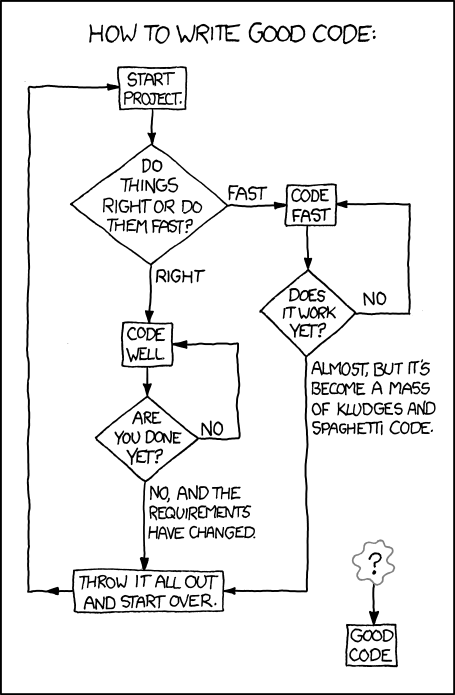

06 January 2011
Notes from Microsoft Dynamics GP 2010 Implementation: Say no to parallel testing
I’m working my way through the ebook version of Victoria’s Microsoft Dynamics GP 2010 Implementation book (and Clancy’s Dead or Alive  and Bogle’s Enough
 all at the same time).
I know that it’s hard to stuff all of the things you want to say in a book so as things struck me, I thought that I would add some emphasis to some of her points.
While working through the section on whether or not to run two systems in parallel, I felt the need to add my own opinion. Just say no. Victoria does a good job of discouraging it but I’m going farther. Just say no to parallel. In addition to Victoria’s reasoning as to why parallel is not a good option (you’ll have to read the book to see those) these are my thoughts :
and Bogle’s Enough all at the same time). I know that it’s hard to stuff all of the things you want to say in a book so as things struck me, I thought that I would add some emphasis to some of her points.
While working through the section on whether or not to run two systems in parallel, I felt the need to add my own opinion. Just say no. Victoria does a good job of discouraging it but I’m going farther. Just say no to parallel. In addition to Victoria’s reasoning as to why parallel is not a good option (you’ll have to read the book to see those) these are my thoughts :
- Companies regularly find that when there is a discrepancy between the legacy system and GP, the legacy system has been wrong for a long time and GP is correct. No one really wants to hear that.
- To manage the workload, companies often bring in contractors or temps for some portion of the testing. This short circuits the learning process for employees and often leads to missed items by non-employees who don’t have the necessary organizational knowledge.
Date Effective Tax Feature for Microsoft Dynamics GP 2010
David Musgrave points us to a great new feature available for Microsoft Dynamics GP 2010, Date Effective Tax. In a nutshell, you can make Sales Tax, VAT and GST rates based on a date range. David has the free download link and I’ll add it to the Downloads section of the website.
Weekly Review: Project Accounting Benefit Allocations
For the last two weeks we've looked at the Project Accounting Cost Allocation added to GP 10 in Feature pack 1. This functionality allows users to take existing costs and allocate them across other projects. Today we are looking at a different animal, Benefit Allocations.
This feature was also added in FP1 (who says you don't get anything for your enhancement $) and is designed to allow companies to add a payroll benefits cost to a project based on the labor time posted to that project.
Start by setting up a benefit in Payroll with Tools-Setup-Payroll-Benefit. A classic example would be the employer portion of healthcare.
Then associate the benefit with a Labor (Timesheet) related cost category. This is done in Cards-Project-Cost Category. Hit the go button icon (window with a little arrow) in the upper right and click benefits.
On the Benefits window, select the benefits to allocate and decide if you want to carve up the benefit amounts based on hours or dollars amount posted. If you use hours, project with more hours get more benefit $. If you use currency amount, higher rate projects may get disproportionally higher benefit allocations, which may be exactly what you want.
Finally, Pick a Misc Log category id to apply the allocation to. You can also send the benefit allocation to a different GL account by clicking the go button again an pressing Accounts. When the Benefit Allocation process is run, a Miscellaneous Log transaction to apply those benefits is created. You'll need to post the Misc. Log transactions to see them on the projects.
Most of the work is in the setup so we're almost done.
After project timesheets are posted, there is a routine that needs to be run to apply benefit allocations. The routine is at Tools-Routines-Project-Benefit Allocation. You can limit the allocation by employee and check date. Check date corresponds to a payroll period and ensures that the right benefits are applied in the allocation since some benefits may not occur on every check.
Click refresh to show what will be allocated and press Process when ready.
That's the basics and it's nice to see that GP has brought benefit allocations to Project Accounting. Don't forget to post the Misc. Log transactions.
This is very new functionality so there may be something that I've missed along the way. If that's the case, please feel free to leave a comment.
Originally Posted by Mark at 10/27/2008 09:00:00 AM
04 January 2011
Simplify FRx by Reducing the Number of Reports
Jan Harrigan continues her series on simplifying FRx by Reducing the Number of Reports. If you work with FRx or Management Reporter you really need to checkout Jan’s site, FRx Buzz.
FICA Update for Dynamics GP.
For those of you looking for official word on the FICA issue due to new tax law changes, it can be found at this CustomerSource location. This is for GP 2010 but there is a similar announcement for GP 10.
In a nutshell:
Round 1 Tax Update for 2011 has been released.
Important Note: The FICA/Social Security withholding changed for employees from 6.2% to 4.2% in 2011. Round 1 included the change to both the Employee and Employer portion due to Microsoft Dynamics GP calculation being based from one amount. Due to this, General Ledger posting, inquiries and reports that show FICA amounts for employers will be calculated using 4.2% for payruns that are processed with Round 1. Round 2 Tax Update will include changes to the employer portion to bring back to 6.2%. We understand the challenges you face with this: however, it was important to release with accurate employee paychecks starting January 1, 2011.
Round 2 Tax Update for 2011 is scheduled to be released the week of 1/24/2011. This update will include changes to the following:
- Arizona
- Colorado
- Hawaii
- Maryland
- New Mexico
- North Dakota
- Oklahoma
- Oregon
- FICA code changes
In Praise of FieldService, Or: Product 949, You Sure Are Fine
Over at High Dynamic Range, Aaron Berquist is (freakishly?) infatuated with FieldService, Or: Product 949, You Sure Are Fine. Checkout his post to find out why.
How to Speed up MS SQL Reporting Services on First Run
MSSQLTips has a great new article up on How to Speed up MS SQL Reporting Services on First Run. If you use Reporting Services with Dynamics GP you’ve likely seen this issue where the first connection to print a report is very slow and then the site is responsive after that. The good folks at MSSQL Tips look at how to fix this.
Update on Payroll FICA Related Changes and Issues
Over the holidays I posted about payroll issues due to new tax changes, but it’s easy to miss things what with all the parties and presents.
Mike Lupro feels that this isn’t getting enough attention and asked me to pass along more information to make sure that you are up to speed. From Mike:
The delayed passage of the 2011 tax relief bill in congress left zero time for software companies to develop the code needed to elegantly handle the change in employee vs. employer FICA and Medicare taxes. The EOY Microsoft Dynamics GP payroll tax update lowers the FICA/Medicare totals for employees to 4.2% as prescribed by congress. However, the employer tax rate is also calculated at 4.2% even though employers still owe 6.2%.
Here is the text of a recent posting on a Microsoft Forum:
Wednesday, December 22, 2010 2:23 AM
At this point, they are still working on how this will be updated in the system; however, the latest information I have received was that the tax tables will be adjusted to the 4.2% and you will need to make adjustments in the GL. You are correct on PIP as well, as the incorrect amount would be brought over,
I have not heard of any plans to create a report for journal entry adjustments, but I will definitely look into this.
· Wednesday, December 29, 2010 2:34 PM
There are no current plans to create an adjustments report for the FICA amounts on the employer side that need to be adjusted. At this time, the GL adjustments will need to be made until the Round 2 tax code update in January where this will be addressed to correct the employer FICA going forward. This round 2 code update will be released for SBF 9.0, GP 9.0, GP 10.0, and GP 2010.
The following is information provided Onza/BestTechsNW payroll clients:
In light of the above information we thought the following math examples will give employers a working structure in how to calculate and expense the correct deposit amount for FICA taxes until Dynamics’ Round 2 tax update is available:
Step 1: Calculate the correct Tax Deposit Amount before remitting to EFTPS:
Fed W/H Tax + Employee FICA/MED Tax + (Employee FICA/MED Tax / 4.2 x 6.2) = Total deposit amount.
Example:
PR Report shows FWT of 14,000 and employee FICA/MED Liability of $10,000
But the employer owes more than the $34,000. Here’s how to calculate the total amount due:
Calculated PR EFTPS deposit amount =
FWT $14,000.00
+ Employee FICA/Med $10,000.00
+ Employer FICA/Med (10,000 / 3.4 x 6.2) = $14,761.90
= Total deposit = $38,761.90
Step 2: Microsoft Dynamics GP will auto-post the (incorrect) 4.2% employer portion for FICA/Med tax
Payroll Process: Credit PR Tax Liability $34,000
Debit PR Tax Expense - Dept 1 $20,000
Debit PR Tax Expense – Dept 2 $14,000
Note: If you’re using PIP (Payables Interface to Payables) the automated voucher amount for the IRS vendor will be $34,000.
Step 3: Remit the correct tax amount to the IRS via EFTPS or through your bank
The payroll liability account now looks like this:
Credit from Payroll $34,000
Debit from EFTPS 38,761.90
= Debit Balance in Liability after EFTPS payment $4,761.90
Step 4: Calculate and post (a GL Transaction) for the departmental expense from the ‘extra’ tax
GL Adjustment Entry Example:
Credit PR Liability Account $4,761.90
Debit PR Tax Expense - Dept 1 $2,801.12
Debit PR Tax Expense - Dept 2 $1,960.78
Mike Lupro feels that this isn’t getting enough attention and asked me to pass along more information to make sure that you are up to speed. From Mike:
The delayed passage of the 2011 tax relief bill in congress left zero time for software companies to develop the code needed to elegantly handle the change in employee vs. employer FICA and Medicare taxes. The EOY Microsoft Dynamics GP payroll tax update lowers the FICA/Medicare totals for employees to 4.2% as prescribed by congress. However, the employer tax rate is also calculated at 4.2% even though employers still owe 6.2%.
Here is the text of a recent posting on a Microsoft Forum:
Wednesday, December 22, 2010 2:23 AM
At this point, they are still working on how this will be updated in the system; however, the latest information I have received was that the tax tables will be adjusted to the 4.2% and you will need to make adjustments in the GL. You are correct on PIP as well, as the incorrect amount would be brought over,
I have not heard of any plans to create a report for journal entry adjustments, but I will definitely look into this.
· Wednesday, December 29, 2010 2:34 PM
There are no current plans to create an adjustments report for the FICA amounts on the employer side that need to be adjusted. At this time, the GL adjustments will need to be made until the Round 2 tax code update in January where this will be addressed to correct the employer FICA going forward. This round 2 code update will be released for SBF 9.0, GP 9.0, GP 10.0, and GP 2010.
The following is information provided Onza/BestTechsNW payroll clients:
In light of the above information we thought the following math examples will give employers a working structure in how to calculate and expense the correct deposit amount for FICA taxes until Dynamics’ Round 2 tax update is available:
Step 1: Calculate the correct Tax Deposit Amount before remitting to EFTPS:
Fed W/H Tax + Employee FICA/MED Tax + (Employee FICA/MED Tax / 4.2 x 6.2) = Total deposit amount.
Example:
PR Report shows FWT of 14,000 and employee FICA/MED Liability of $10,000
But the employer owes more than the $34,000. Here’s how to calculate the total amount due:
Calculated PR EFTPS deposit amount =
FWT $14,000.00
+ Employee FICA/Med $10,000.00
+ Employer FICA/Med (10,000 / 3.4 x 6.2) = $14,761.90
= Total deposit = $38,761.90
Step 2: Microsoft Dynamics GP will auto-post the (incorrect) 4.2% employer portion for FICA/Med tax
Payroll Process: Credit PR Tax Liability $34,000
Debit PR Tax Expense - Dept 1 $20,000
Debit PR Tax Expense – Dept 2 $14,000
Note: If you’re using PIP (Payables Interface to Payables) the automated voucher amount for the IRS vendor will be $34,000.
Step 3: Remit the correct tax amount to the IRS via EFTPS or through your bank
The payroll liability account now looks like this:
Credit from Payroll $34,000
Debit from EFTPS 38,761.90
= Debit Balance in Liability after EFTPS payment $4,761.90
Step 4: Calculate and post (a GL Transaction) for the departmental expense from the ‘extra’ tax
| Dept Amt | Total Amt | Percent by Dept | Extra tax amt | Dept Exp Amt |
| 20000 | 34000 | 0.588235294 | 4761.9 | $ 2,801.12 |
| 14000 | 34000 | 0.411764706 | 4761.9 | $ 1,960.78 |
Credit PR Liability Account $4,761.90
Debit PR Tax Expense - Dept 1 $2,801.12
Debit PR Tax Expense - Dept 2 $1,960.78
Upgrade Your GPUG Membership
Time is running out to get a free copy of the Microsoft Dynamics GP 2010 Cookbook when you upgrade your GPUG membership from basic to premium.
You’ve made all of those New Year’s resolutions, now is the time to lay the foundation for your work related resolutions with the Microsoft Dynamics GP 2010 Cookbook and learning options from GPUG. If you want better work/life balance, the cookbook and GPUG’s learning options can show you how to get more out of Dynamics GP so you can go home and spend more time on that life part.
Hurry though, this offer ends January 31, 2010.
03 January 2011
Congrats to Victoria Yudin
Congrats to Victoria Yudin who adds another year as an MVP to her resume’ that includes her new book Microsoft Dynamics GP 2010 Implementation.
Google for Dynamics GP: Smart Search
Landis Computer has announced a new search product coming soon for inside of Dynamics GP. Check out the video for Smart Search
Quick Tip: Account Number Not Fully Displayed In Custom Window
Patrick Roth looks at a solution for when an Account Number is Not Fully Displayed In Custom Window.
Year-End Closing: Backup And Backup Data
DynamicsBlogger reminds us that for Year-End Closing: Backup And Backup Data. This is one of those things I’ve always preached and practiced. Even a large GP database can be backed up relatively quickly compared to the cost of an error.
Weekly Dynamic: GL/MDA SQL
This week’s Weekly Dynamic comes from Jeremy Lowell of DataRealized.com.
This SQL code is designed to join Multi-Dimensional Analysis (MDA) tables back to the GL. It’s a little complicated but it seems to work fine.
select distinct dta10100.GROUPID,
dta10200.CODEID,dta10200.POSTDESC,
gl20000.* from GL20000
LEFT OUTER JOIN dbo.DTA10100 ON dbo.DTA10100.JRNENTRY = dbo.GL20000.JRNENTRY AND dbo.DTA10100.ACTINDX = dbo.GL20000.ACTINDX AND DTA10100.SEQNUMBR = GL20000.SEQNUMBR AND GL20000.ORCTRNUM = DTA10100.DOCNUMBR LEFT OUTER JOIN dbo.DTA10200 ON dbo.DTA10200.DTAREF = dbo.DTA10100.DTAREF and GL20000.SEQNUMBR = GL20000.OrigSeqNum
UNION
select dta10100.GROUPID,dta10200.CODEID,dta10200.POSTDESC,
gl20000.* from GL20000 LEFT OUTER JOIN dbo.DTA10100 ON dbo.DTA10100.JRNENTRY = dbo.GL20000.JRNENTRY AND dbo.DTA10100.ACTINDX = dbo.GL20000.ACTINDX AND DTA10100.SEQNUMBR = GL20000.OrigSeqNum AND GL20000.ORCTRNUM = DTA10100.DOCNUMBR LEFT OUTER JOIN dbo.DTA10200 ON dbo.DTA10200.DTAREF = dbo.DTA10100.DTAREF and GL20000.SEQNUMBR <> GL20000.OrigSeqNum
Jeremy has an update to this that I've promoted from the comments:
In looking at the data in the GL20000 tables and the DTA10100 table, the SDK calls for joining the following columns in order to obtain the MDA data for the GL transaction: JRNENTRY, ACTINDX, SEQNUMBR.
In my experience, I had a terribly Cartesian product when I made that join. While I haven't yet tracked down why that's the case, I ended up doing the following:
I took all of the data out of each of the GP companies ~ 50 and persist them into tables in my staging database. For MDA data, I have one table for the DTA10100 and DTA10200 data and another table for the GL20000 and 30000 data.
Once I have that data, I update a column that I created (dexrowid_GL) via 8 different steps... Basically creating a "validity" of each join. That logic is below.
-8 -- Must match on AccountNumber, JournalEntry, TRXDate, SequenceNumber, DocNumber and amount(dollars).
-7 -- Must match on AccountNumber, JournalEntry, TRXDate, DocNumber and amount(dollars).
-6 -- Must match on AccountNumber, JournalEntry, TRXDate, SequenceNumber and DocNumber
-5 -- Must match on AccountNumber, JournalEntry, TRXDate and DocNumber
-4 -- Must match on AccountNumber, JournalEntry, TRXDate, SequenceNumbrer, amount(dollars) and the SequenceNumber MUST NOT equal the OriginatingSequenceNumber.
-3 -- Must match on AccountNumber, JournalEntry, TRXDate, amount(dollars) and the SequenceNumber MUST NOT equal the OriginatingSequenceNumber
-2 -- Must match on AccountNumber, JournalEntry, TRXDate and amount(dollars).
42 -- There is not enough data to join the MDA transaction to the GL transaction.
Thus far, I have less than one percent of records that will not join with the logic mentioned above. I'm still working on ironing out why I have to jump through all of these hoops and I'm quite certain that it's a 3rd party application but I have yet to prove that out.
Good luck in accurately joining your MDA transactions to your GL transactions.... what should be fairly straight forward per the SDK has proven to be anything but for the dataset that I'm working against
This SQL code is designed to join Multi-Dimensional Analysis (MDA) tables back to the GL. It’s a little complicated but it seems to work fine.
select distinct dta10100.GROUPID,
dta10200.CODEID,dta10200.POSTDESC,
gl20000.* from GL20000
LEFT OUTER JOIN dbo.DTA10100 ON dbo.DTA10100.JRNENTRY = dbo.GL20000.JRNENTRY AND dbo.DTA10100.ACTINDX = dbo.GL20000.ACTINDX AND DTA10100.SEQNUMBR = GL20000.SEQNUMBR AND GL20000.ORCTRNUM = DTA10100.DOCNUMBR LEFT OUTER JOIN dbo.DTA10200 ON dbo.DTA10200.DTAREF = dbo.DTA10100.DTAREF and GL20000.SEQNUMBR = GL20000.OrigSeqNum
UNION
select dta10100.GROUPID,dta10200.CODEID,dta10200.POSTDESC,
gl20000.* from GL20000 LEFT OUTER JOIN dbo.DTA10100 ON dbo.DTA10100.JRNENTRY = dbo.GL20000.JRNENTRY AND dbo.DTA10100.ACTINDX = dbo.GL20000.ACTINDX AND DTA10100.SEQNUMBR = GL20000.OrigSeqNum AND GL20000.ORCTRNUM = DTA10100.DOCNUMBR LEFT OUTER JOIN dbo.DTA10200 ON dbo.DTA10200.DTAREF = dbo.DTA10100.DTAREF and GL20000.SEQNUMBR <> GL20000.OrigSeqNum
Jeremy has an update to this that I've promoted from the comments:
In looking at the data in the GL20000 tables and the DTA10100 table, the SDK calls for joining the following columns in order to obtain the MDA data for the GL transaction: JRNENTRY, ACTINDX, SEQNUMBR.
In my experience, I had a terribly Cartesian product when I made that join. While I haven't yet tracked down why that's the case, I ended up doing the following:
I took all of the data out of each of the GP companies ~ 50 and persist them into tables in my staging database. For MDA data, I have one table for the DTA10100 and DTA10200 data and another table for the GL20000 and 30000 data.
Once I have that data, I update a column that I created (dexrowid_GL) via 8 different steps... Basically creating a "validity" of each join. That logic is below.
-8 -- Must match on AccountNumber, JournalEntry, TRXDate, SequenceNumber, DocNumber and amount(dollars).
-7 -- Must match on AccountNumber, JournalEntry, TRXDate, DocNumber and amount(dollars).
-6 -- Must match on AccountNumber, JournalEntry, TRXDate, SequenceNumber and DocNumber
-5 -- Must match on AccountNumber, JournalEntry, TRXDate and DocNumber
-4 -- Must match on AccountNumber, JournalEntry, TRXDate, SequenceNumbrer, amount(dollars) and the SequenceNumber MUST NOT equal the OriginatingSequenceNumber.
-3 -- Must match on AccountNumber, JournalEntry, TRXDate, amount(dollars) and the SequenceNumber MUST NOT equal the OriginatingSequenceNumber
-2 -- Must match on AccountNumber, JournalEntry, TRXDate and amount(dollars).
42 -- There is not enough data to join the MDA transaction to the GL transaction.
Thus far, I have less than one percent of records that will not join with the logic mentioned above. I'm still working on ironing out why I have to jump through all of these hoops and I'm quite certain that it's a 3rd party application but I have yet to prove that out.
Good luck in accurately joining your MDA transactions to your GL transactions.... what should be fairly straight forward per the SDK has proven to be anything but for the dataset that I'm working against
Subscribe to:
Posts (Atom)