
You, Me and Dynamics GP
The premier information site for Microsoft Dynamics GP
30 October 2009
Unable to Perform Cost Rollup in GP Manufacturing

Dynamics GP and 1099's Part 4
29 October 2009
Changing Item Quantity from One Type to Another

Convergence UK Coverage
Print Crystal Reports Directly to the printer using VBA

Weekly Review: Cut a Check Without Adding the Vendor
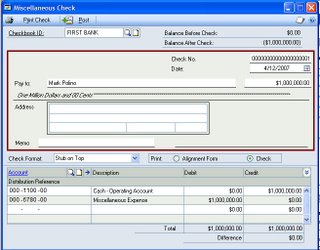
Dynamics GP 9.0 and 10 include functionality to let you cut a check on the fly, without adding the vendor. Don't look for this functionality under Purchasing though, it's actually part of the Banking module and it's found in Transactions-Financial-Miscellaneous Check.
The screen is very easy to use, almost Quickbooky (if that's a word). Simply pick your checkbook, fill out a standard check, with available address lines, and set your distribution accounts. There's a big PRINT CHECK button in the upper left and a POST button next to it.
There doesn't appear to be any controls on this window beyond normal security features but there's no batch, batch approval or secondary approval. This is normal for banking windows in Dynamics GP but it would be nice if they would add batches to provide some consistency. There don't appear to be any setup windows or settinss related to this feature and the only way to turn it off is to deny access via security.
These transactions are treated like any other bank transaction. They are voided via Bank Transactions, not via Historical Purchasing Transactions. Drill down to the transaction level is available from Bank Rec and the Checkbook register. You can only reprint prior to posting. There isn't any way to turn this into a regular payables transaction except to void it and start over via AP. So make sure you really don't want to add that vendor! This is a nice little addition for certain circumstances and businesses and it's very easy to use. However, expect your auditors to want to look through these transactions and the security around this window.
Originally Posted by Mark 4/30/2006 09:20:00 PM
28 October 2009
Dynamics GP and 1099's Part 3

Multiple Date Requirements and Dynamics GP

Account Framework

Analysis Cube Issue

27 October 2009
Dynamics GP and 1099's Part 2

Hybrid Development Approach for Dynamics GP

Create Your Own Report Writer Report

Dynamics GP Units of Measure

26 October 2009
KPIs in Business Portal

That Dangerous SA Account
- Some ISV apps can ONLY be installed using SA. Other techniques to avoid the use of SA don't work here. Frankly, this needs to be fixed by ISV's. It's a problem that people whine about but hasn't been addressed.
- Andy makes the point that SA does not have to be a power user. I agree, mostly. The catch 22 is this, most consultants expect SA to be a power user. In fact a common troubleshooting technique is to determine if SA can do something, since that often indicates whether a problem is security related. If you don't communicate that SA has limited rights you can spend a fortune on unnecessary troubleshooting. It's often one of those "slipped my mind" kind of things. Notice the issue is not limited SA rights but communicating that SA rights have been limited, since this is still surprisingly rare.
- Additionally, if security is NOT well setup, the presence of SA as a power user can be a lifeline when say, payroll checks don't print because of a security problem.

Rapid Implementation Tool for Export/Copy/Backup

Dynamics GP 10 and 1099s

SQL View for All Posted Payables Documents and Apply Info

10 Reasons to Attend the Dynamics GP Technical Conference

sanScript Troubleshooting for Dynamics GP

Dynamics GP Sales Tips

Dynamics GP 10 Letter Writing Assistant

Weekly Dynamic: Pass Payments Through the Payables Account

This is really more of a preference issue. Both options are correct but sometimes you just want to see the everything that happened and eliminate the shortcuts.
Update: The second illustration has been corrected to properly show the cash distribution.

22 October 2009
Weekly Review: Putting the Fix in Fixed Assets
Fixed sporting events are bad. Fixed transmissions are good. Fixed Assets are ...well... in between.
Today I want to look at some potential issues in the Fixed Asset module and what you can do about it. I'm using version 8 but these items should apply backwards and forward for several versions. There haven't been that many chages to FA. So here we go:
- The Fixed Asset module has it's own calendar in Tools-Setup-Fixed Assets-Quarter. You may think that this is no big deal, it's used for the mid-quater convention, yada yada. BUT if your Fixed Asset calendar is different from your financial calendar, you can have a mess! What can happen is that if you run depreciation only for the current period, because the financial and FA periods don't match, part of your depreciation may not flow to the GL! Oops. So if you're on a fiscal calendar, double check your FA calendar too. Go on. Do it now we'll wait.
- You think you have a problem with a Fixed Asset and the GL. Where do you look? The Inquiry-Fixed Asset-Financial Detail windows is your best friend. The batch number in this window shows the GL interface batch. If you have gaps, the data didn't go to the GL. (Of course, since you do account account recons you found and fixed this via a JE at month end. Didn't you?)

- Partial Retirments Just so you understand what a partial retirement transactions does, here's the scoop. Let's say I have asset 100-1 and it contains Ferraris with a quantity of 5 (it was a special bulk price). When you total one of my Ferraris, I have to partially retire the asset since it has a quantity greater than one and you only totalled one of my Ferraris. When the partial retirement is done, GP creates a second asset behind the scenes to hold the retired portion. In this case asset 100-2 would be created and it would contain 1 retired Ferrari. Asset 100-1 has it's quantity and cost reduced by the amount of the retired portion and it remains the active asset. When you look in the Retirements window, you see asset 100-1 with the partially retired flag set, but all you see is the active portion when you drill down on the asset id. To find out info about the retired portion, you have to go find the correct suffix for that asset and drill down on it via the regular FA inquiry window. More importantly, you totalled one of my Ferraris!
Originally Posted by Mark 4/26/2006 12:31:00 PM
21 October 2009
FRx Security
20 October 2009
Dynamics GP Accidental Administrators

VST - Amount in Words on SOP Entry Window

Dynamics GP Write Off Functionality for Receivables

19 October 2009
Restricting FRx Row Results to Specific Columns

Management Reporter Beta Testers Wanted

Popping Up Specific Extender Windows

Electronic 1099 Filing

Changing the Business Portal Logo

1099 True Up

50 New Tips for Dynamics GP

Weekly Dynamic: Copy Headings and Data from SQL
This is not just a new feature in SQL 2008 but it works in SQL 2005, the feature is just not on by default. To turn it on, select Tools-Options in SQL Server Management Studio. Expand Query Results with the +. Expand SQL Server. Select Results to Grid and check the box "Include Column headers when copying or saving the results." Click Ok.

I felt dumb when I found this the first time but I feel brilliant every time I show it to someone else!
16 October 2009
New GP Webinars to Help You Get Smarter Faster
Oh yeah and I'm doing two of the six. Yipee!
On November 10th, I'm taking a look at the fantastic Support Debugging Tool for Dynamics GP. We showed some parts of this at iSight but we had plenty of requests for more info, so now we're delivering. In a second webinar on December 8th I'll take a look at some freely available SQL tools, tips and scripts designed to make managing Dynamics GP easier.
The full schedule is below and you can register here.
Is ANYTHING free these days?
Date: 11/3/2009 11:00-12:00 EST
Speaker: Christina Belding, I.B.I.S. Managing Consultant
A
quick review exploring CustomerSource, un-publicized Microsoft
resources, and some of the best tips & blogs out there that will
enable you to research like a power user (even if you aren’t one)!
Support Debugging Tool
Date: 11/10/2009 11:00-12:00 EST
Speaker: Mark Polino, I.B.I.S. Senior Consultant and Microsoft MVP
Learn
about this great FREE tool from Microsoft that provides multiple
logging and debugging functions as well as look and feel options within
GP.
Dynamics GP and the “Lean” Office
Date: 11/17/2009 11:00-12:00 EST
Speaker: Amy Walsh, I.B.I.S. Senior Consultant
Tips on how to incorporate Dynamics GP functionality into the “Lean” methodology of business processes.
Business Intelligence
Date: 12/1/2009 11:00-12:00 EST
Speaker: Dwight Specht, I.B.I.S. Chief Operating Officer
What
is BI? Which BI tools and products would benefit my business? What kind
of investment in money and time will we have to make? Join us as Dwight
shares his Business Intelligence expertise.
SQL Server Tips
Date: 12/8/2009 11:00-12:00 EST
Speaker: Mark Polino, I.B.I.S. Senior Consultant and Microsoft MVP
Tips
on how to run SQL queries from both the Support Debugging Tool and
Admin Console; run through some common queries, and learn how to copy
and paste headers from Management Studio.
ISV Spotlight – Tectura ReqLogic
Date: 12/15/2009 11:00-12:00 EST
Speaker: Rich Fowler, Tectura Expert
Learn
about the leading .NET browser based application for procurement,
requisitioning, vendor invoicing, expense processing and workflow, that
integrates seamlessly with Microsoft Dynamics GP.

15 October 2009
SQL Connection Error

Continuum for Dynamics GP

Smartlist GoTo's

Totalling a Field in a Conditionally Suppressed Report Section

Weekly Review: Edit Check Batch
Dynamics GP Version 9 introduced a new AP screen but a lot of users still don't know it's there so this week's review highlights the Edit Check Batch functionality.
Selecting Edit Check Batch lets you create a new check batch or modify an existing one but the screen view is much closer to Quickbooks or Peachtree. You simply check vendors you want to pay and then you select or deselect invoices with a simple check box. This is really easy and should reduce the AP learning curve for new employees.
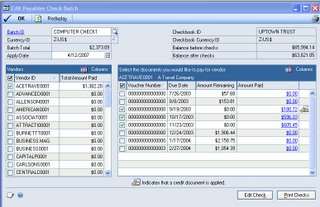
As a bonus, you can even change which columns are displayed ,to show additional information, using the COLUMNS controls in the corners. This really provides nice control over the information you see when processing checks.
It's nice to see the Dynamics GP group putting some effort into improving core functions like AP, not just adding bells and whistles.
Originally Posted by Mark 4/11/2006 09:38:00 AM
13 October 2009
Automatic Credit Hold
SQL View for All Posted Payables Transactions

MACRS Depreciation in GP

Support for GP 8.0 Ends Today

GP Technical Conference - It's Not Too Late


